Windows · macOS · iPhone · iPad

Upsampler and neural stage, at your desk and in your pocket.

HeadMania.org Upsampler plays your library, HIGHRESAUDIO and lossless radio through very long reconstruction filters, then sends the result to your USB DAC and headphones, or over Wi-Fi to any UPnP network streamer in the house. Neuromancer, its optional neural stage, reshapes the sound as the song plays. It is experimental, and it switches on only where your device keeps up in real time.

  • 64-bit engine
  • 4M taps live · 16M for files
  • UPnP over Wi-Fi
  • PCM ×2 to ×32
  • DSD1024 · DSD2048 (experimental)

Also for: macOS (Apple silicon) iPhone & iPad Android remote (test)

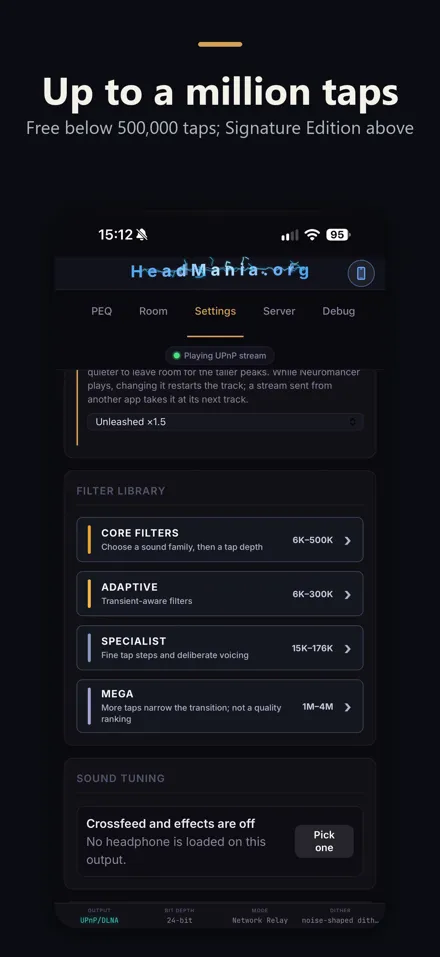
Free on Windows and Mac. On iPhone and iPad, free below 500,000 taps; the one-time Signature Edition adds the larger filters. You plug in a USB DAC, or stream over Wi-Fi to a UPnP streamer; Diretta works on Windows.

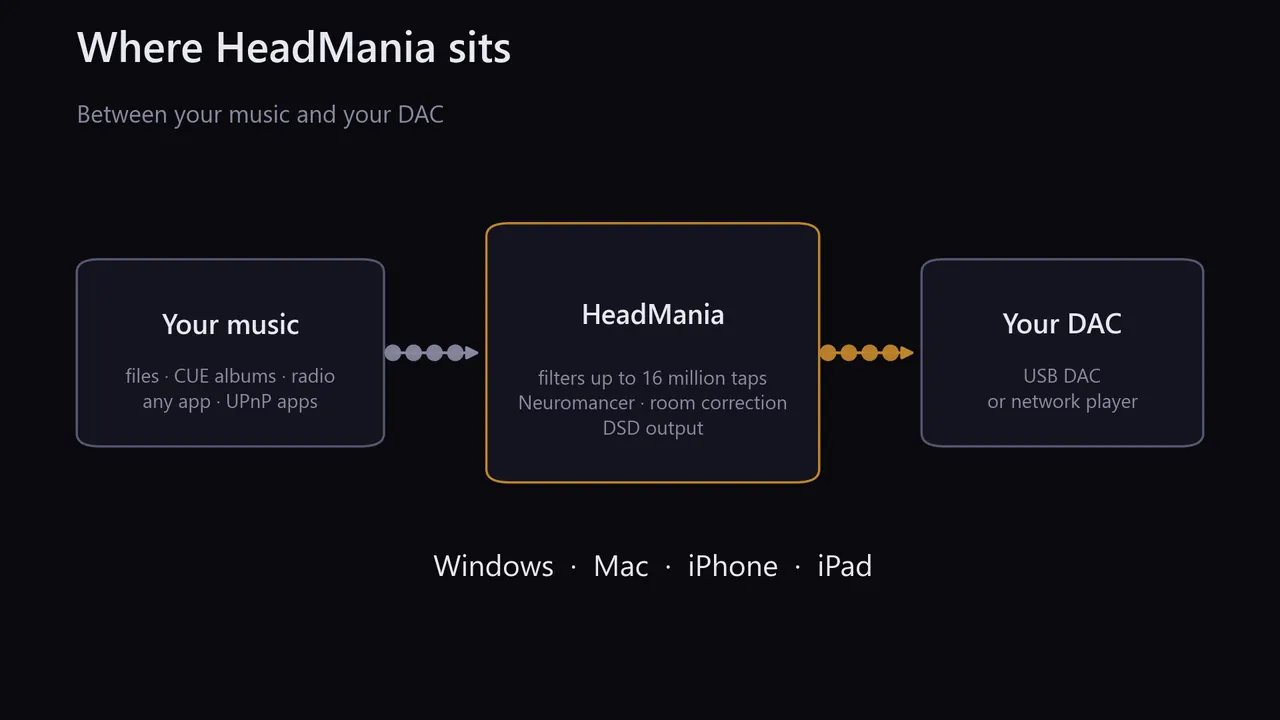
Your music Library · HIGHRESAUDIO · Radio · Any app 48 kHz · 24-bit HeadMania engine 64-bit · Organik 4M · ×16 filter impulse (illustration) 768 kHz · 32-bit or DSD up to 1024/2048 USB DAC or Diretta UPnP streamer over Wi-Fi

What it does

Three steps between your music and your DAC.

  1. 1

    Play

    Your own files and CUE sheets, HIGHRESAUDIO with your subscription, lossless radio, or the sound of any other app.

  2. 2

    Upsample

    The engine computes in 64-bit and filters with up to 4 million taps live. You pick the filter's character: Linear, Organik or in between.

  3. 3

    Send

    To your USB DAC, or over Wi-Fi to any UPnP network streamer in the house; also Diretta, and USB-C DACs on iPhone and iPad. The Play tab shows exactly what is running.

Your music, through HeadMania, to your DAC, on Windows, Mac, iPhone and iPad.
More detail, from the app

HeadMania is an upsampler, DSP engine and music server for Windows and macOS. It computes in 64-bit floating point, and in double-double (about 106-bit) for Reference Precision. It does the reconstruction filtering your DAC would otherwise do, with filters of up to 4 million taps live and 16 million for file playback. Play your library or lossless radio, filter what other apps play, or run it as a server you control from your phone. The Play tab always shows the filter and rate actually running.

What It Does on iPhone & iPad

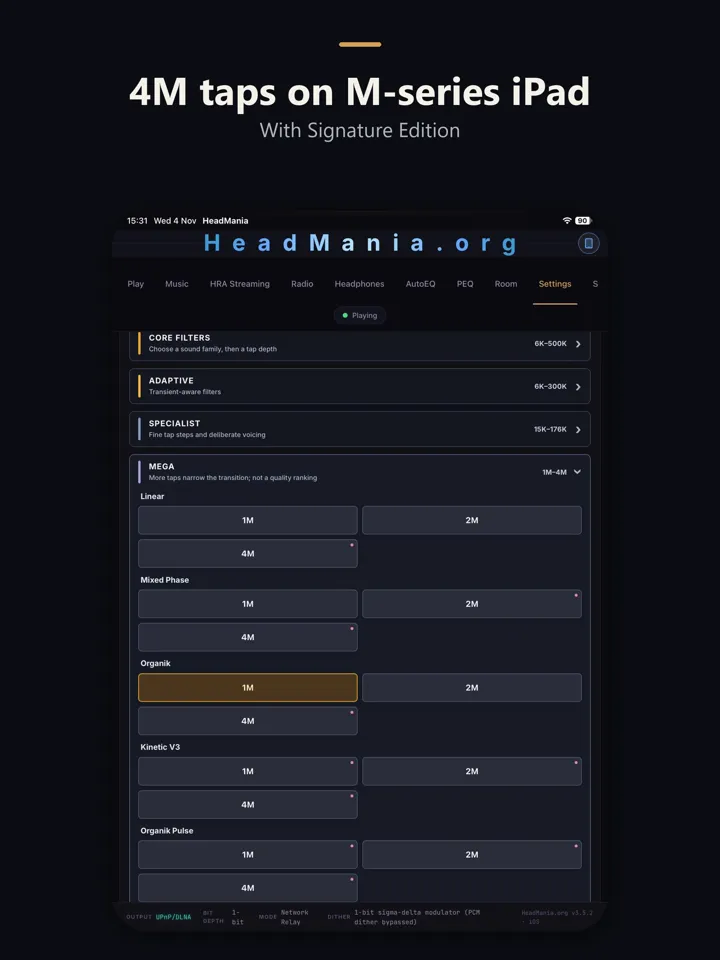
HeadMania turns an iPhone or iPad into a 64-bit upsampler and network renderer. Play your own files or lossless radio, or send music from a UPnP app such as JPLAY or mconnect, then out to a USB-C DAC or a streamer on your network. Filters run up to 1 million taps on iPhone and 4 million on iPad Pro M5 and other M-series iPads. It can also remote-control HeadMania on your computer. The Play tab always shows the filter and rate actually running.

Streaming partner

HIGHRESAUDIO, built in.

“A seamless integration inside HeadMania’s UpSampler 3, makes listening to HiRes music, effortlessly, comfortable and more enjoyable for hours.”

Lothar Kerestedjian, CEO and founder of HIGHRESAUDIO

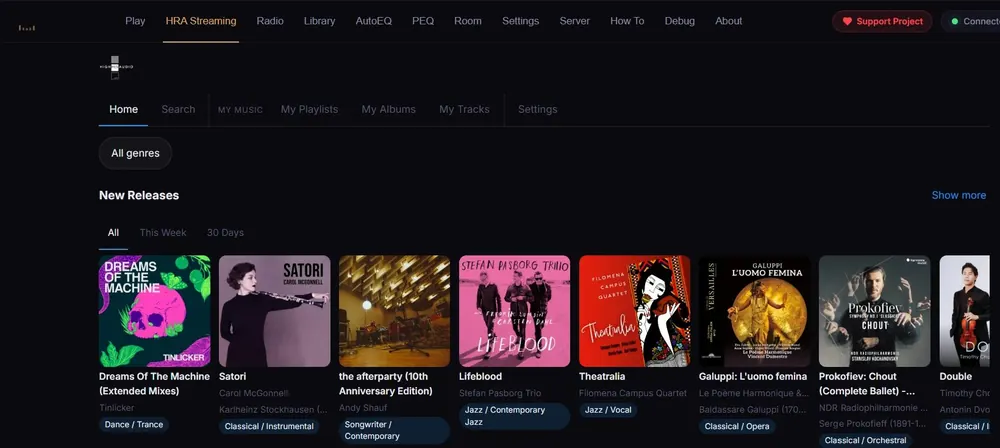
HIGHRESAUDIO, the Berlin store and streaming service for high-resolution music, lives in its own HRA Streaming tab. Sign in with your subscription and every track takes the same path as a file on your own disk: your filter, Neuromancer, DSD conversion if you want it, the EQ and the room correction (in testing), then out to your USB DAC or network player.

  • Home page with charts, new releases and editorial playlists; search; albums
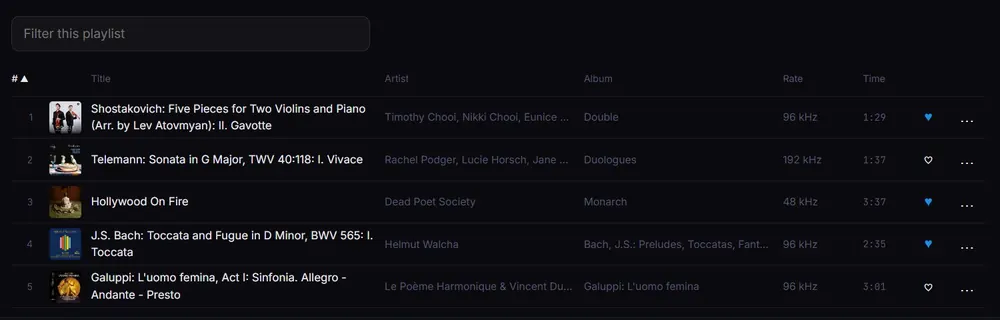
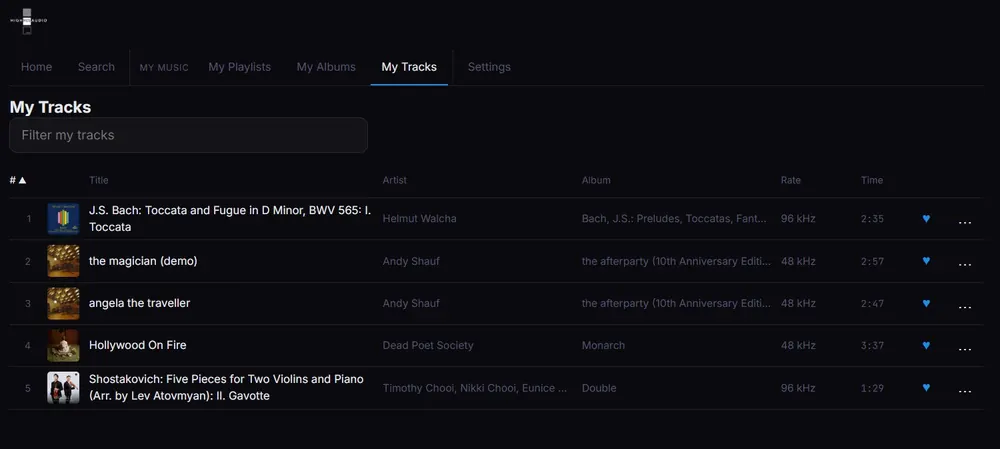
  • Your playlists, favourites and My Tracks; albums and playlists play on, track after track
  • Streamed and held in memory while it plays: no music is written to disk
  • On iPhone and iPad: cover and Previous/Next on the lock screen, and the album keeps playing locked
  • With HeadMania running as a server, browse and play it from a browser or your iPhone, anywhere at home
  • HIGHRESAUDIO delivers its catalogue unaltered, it says: no volume matching, no re-encoding, no down-sampling on the fly, no adaptive streaming

The engine, in numbers

Six numbers you can check.

No slogans: each card says what was measured and what it costs. Pick your platform to see what applies to you.

16M

taps for file and server playback

Computed in double-double, about 106-bit. The step from full level to 100 dB down narrows to 0.14 Hz.

How it was measured

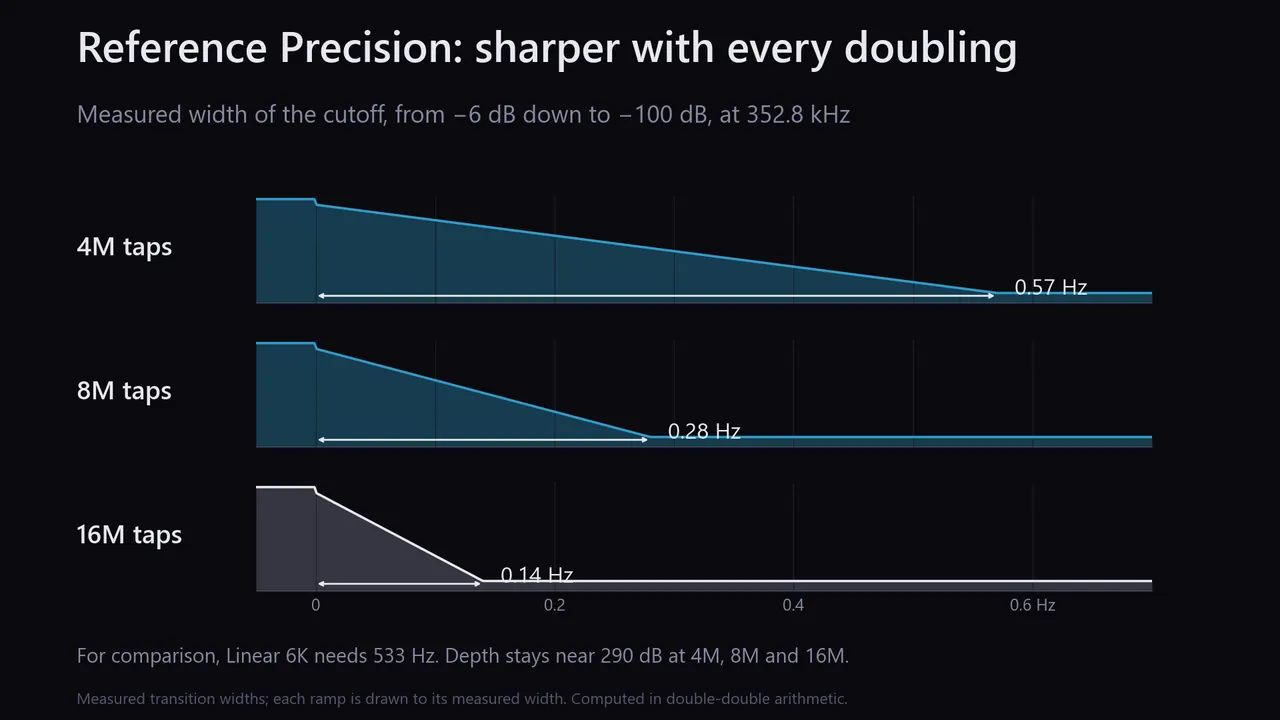
Reference Precision at 4M, 8M and 16M taps. Each doubling halves the cutoff width: 0.57 Hz at 4M, 0.28 Hz at 8M, 0.14 Hz at 16M. Costs seconds of start-up delay and heavy CPU; not for live capture.

taps for file and server playback
Windows & Mac
1M · 4M

taps live on iPhone, and on M-series iPads

The same engine in your pocket, out to a USB-C DAC or a streamer on your network.

How it was measured

Free below 500,000 taps; the one-time Signature Edition adds the larger filters. Over USB-C, iPhone and iPad send PCM, up to ×16; to a UPnP streamer they send DSD too, where it accepts DSD.

taps live on iPhone, and on M-series iPads
iPhone & iPad
<0.2 ms

delay with Organik Live, up to 1M taps

No block to wait for, so long filters work for video, games and live capture.

How it was measured

Block filters (Live Linear, Live Organik, Cascade) wait 3.7 to 9.8 ms from a 44.1 kHz source. Organik Live filters each sample as it arrives: 0.13 to 0.18 ms. Live capture’s own audio buffers still add tens of milliseconds.

delay with Organik Live, up to 1M taps
Windows & Mac
90%

of the drums’ 16–22 kHz attack energy takes Pulse’s fast path

Drum hits get a short filter; everything between them stays on the long one.

How it was measured

Measured on 21 recordings: Touch sends 61%, Pulse 90%. The short path is a 575-tap minimum-phase filter.

of the drums’ 16–22 kHz attack energy takes Pulse’s fast path
All platforms
8.5M

learned values in Neuromancer, a neural stage before the filter

Optional. It runs on your graphics card or the Neural Engine, after a speed test on your device.

How it was measured

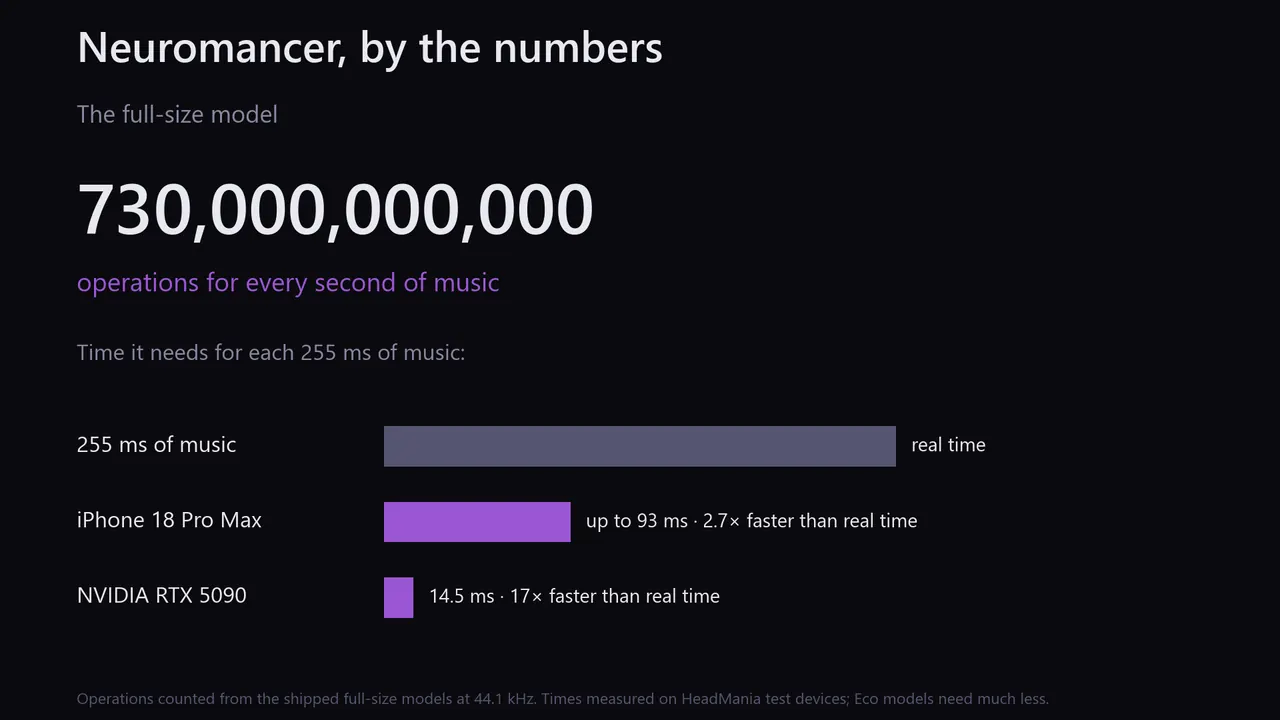
About 730 billion operations for every second of music. Adds a few seconds of start-up delay; switches on only when your device keeps up. It keeps the graphics card or the Neural Engine busy, which costs power.

learned values in Neuromancer, a neural stage before the filter
All platformsExperimental
DSD1024

DSD from HeadMania’s own modulator

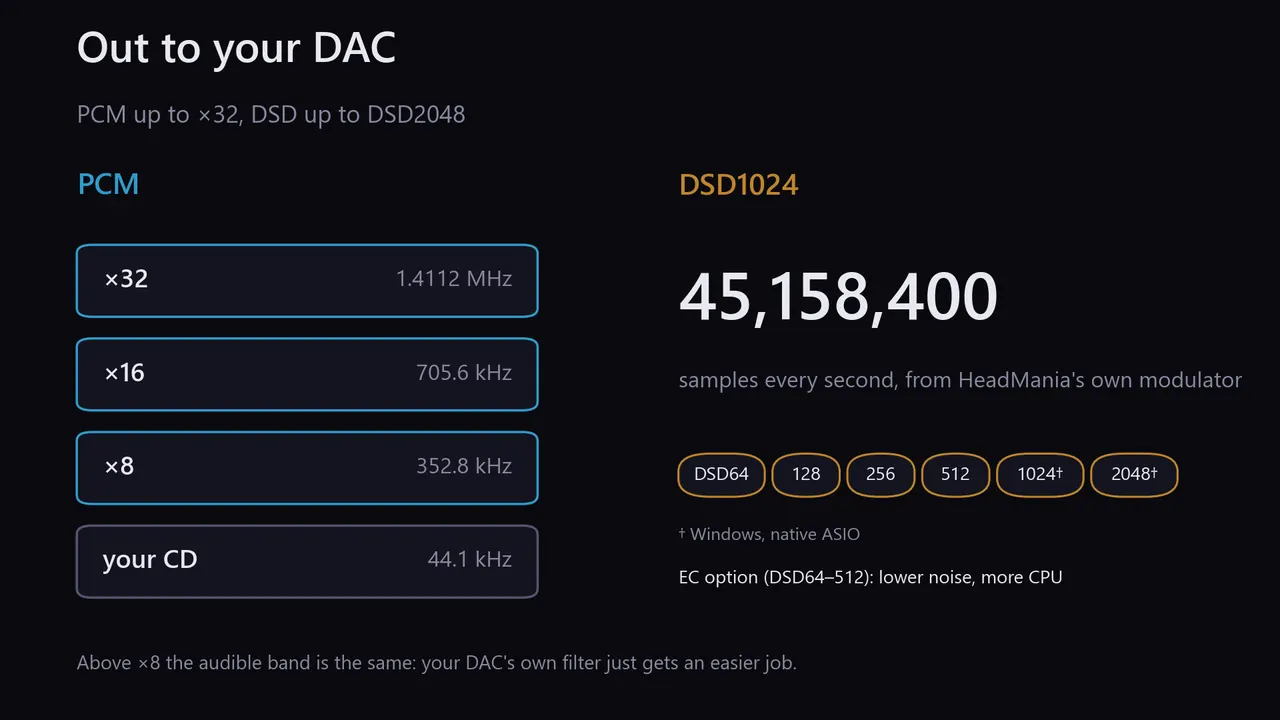
For true 1-bit and hybrid DACs: DSD64 to DSD512, DSD1024 on Windows, and DSD2048 as an experiment. PCM runs from ×2 to ×32.

How it was measured

In-band dynamic range of the modulator, 1 kHz tone, 20 Hz–20 kHz: 224 dB at DSD1024, above 240 dB at DSD2048. Read it as headroom: a DAC’s analog stage typically sits near 120 dB. DSD2048 needs an AVX2 processor.

DSD from HeadMania’s own modulator
Windows, native ASIODSD2048 experimental

On Windows and Mac, unzip the download and open the app inside; after that, updates arrive in the app, signed and installed when you choose. All versions and release notes: GitHub releases.

Filters

Choose how your music rings.

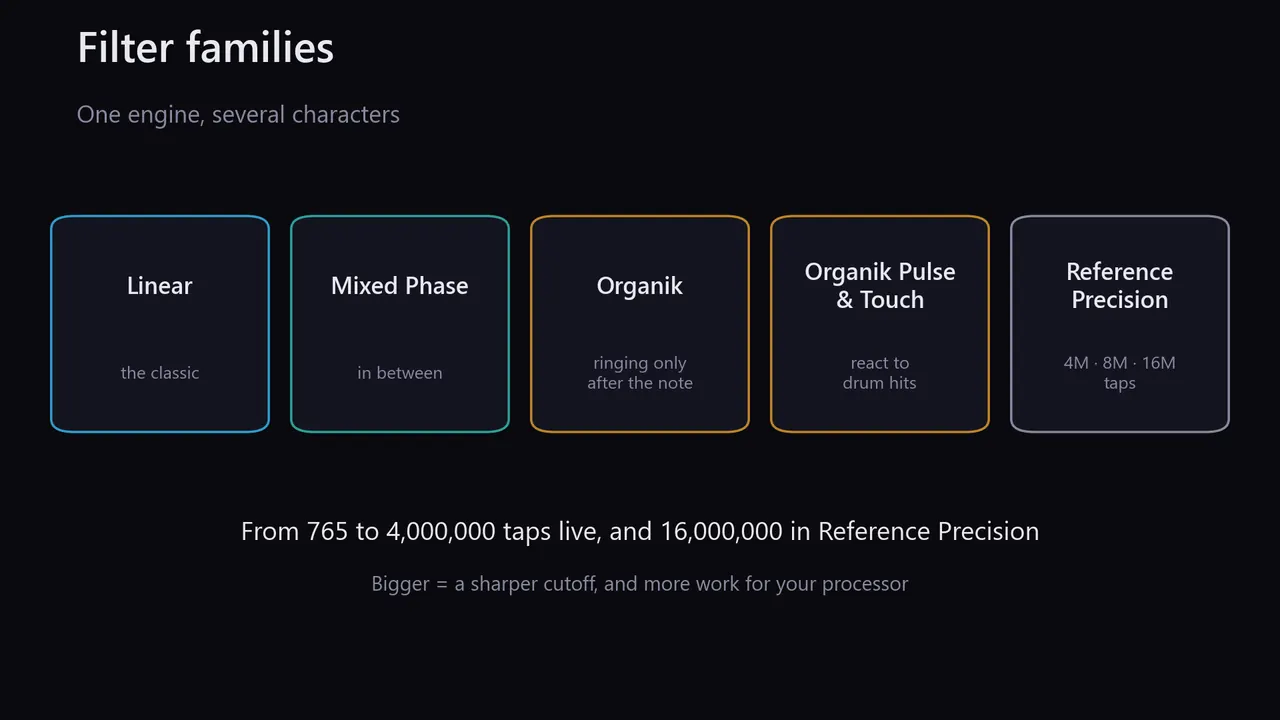
Every filter family runs from short to very long. Longer filters cut closer to the band edge; the phase choice decides where the ringing goes.

Linear

Ringing spreads evenly before and after each transient, with the same delay at every frequency.

6K – 4M taps

Organik

The same frequency response as Linear, with its ringing moved after the transient.

6K – 4M taps

Mixed Phase

Between the two: very little ringing before a transient, longer ringing after it than Linear.

6K – 4M taps

Touch & Pulse

Organik with a fast path for drum attacks.

6K – 4M taps

Reference Precision

Double-double computation at 4M, 8M and 16M taps, for file and server playback.

4M – 16M taps · Windows & Mac

Organik Live

For video, games and live capture: no block, under 0.2 ms.

10K – 1M taps · Windows & Mac
The filter families, from about 6,000 to 4 million taps live and 16 million in Reference Precision.
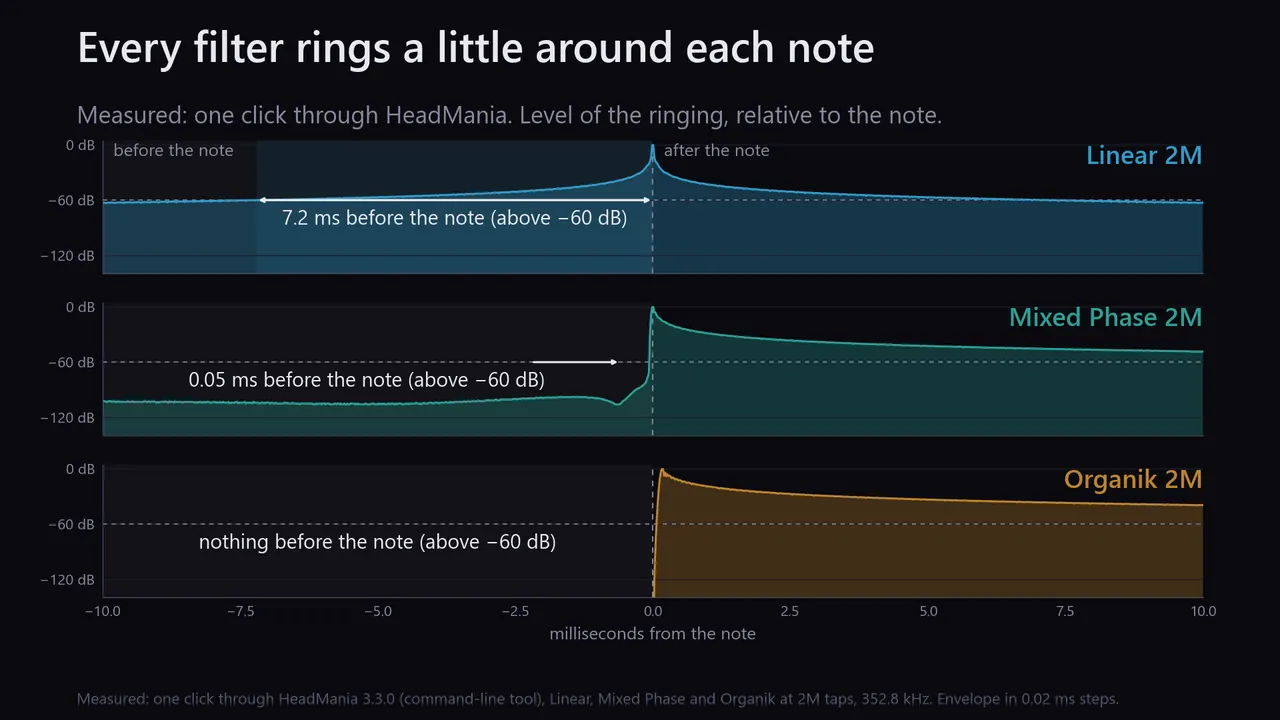
Measured ringing before a click: Linear 2M 7.2 ms, Mixed Phase 2M 0.05 ms, Organik 2M none.
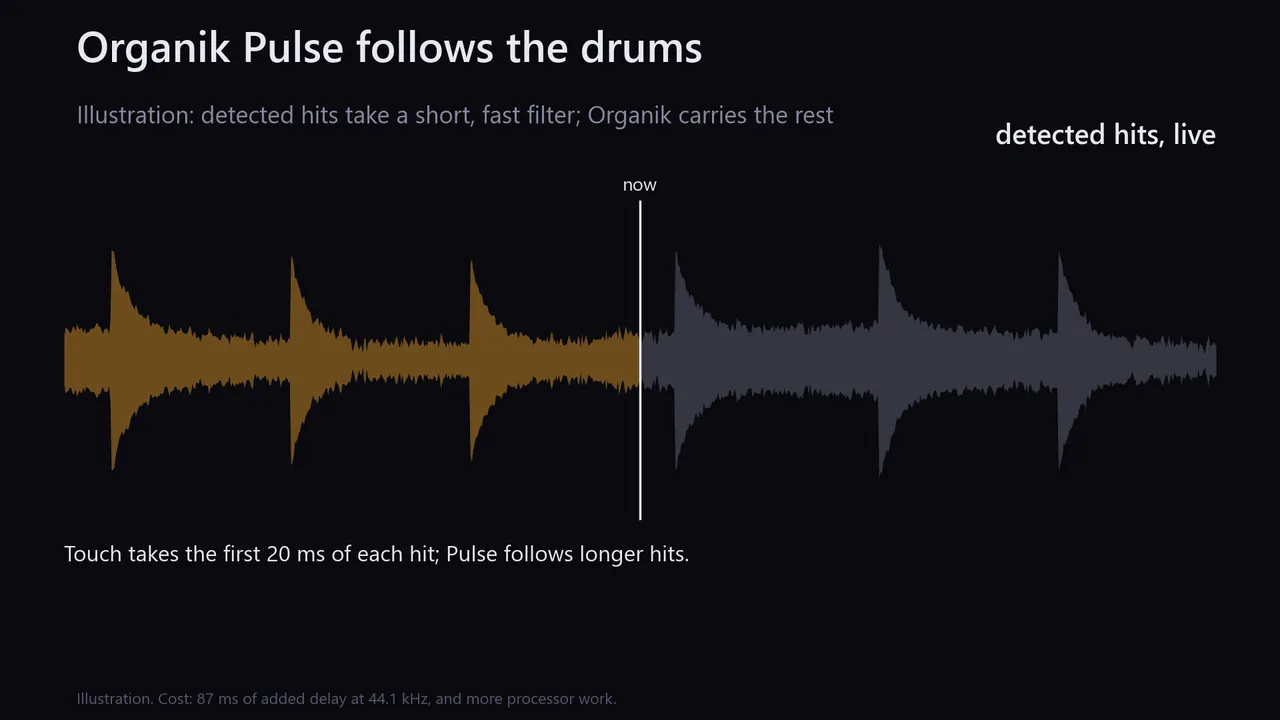
Illustration: detected drum hits take a short, fast filter while Organik carries the rest.
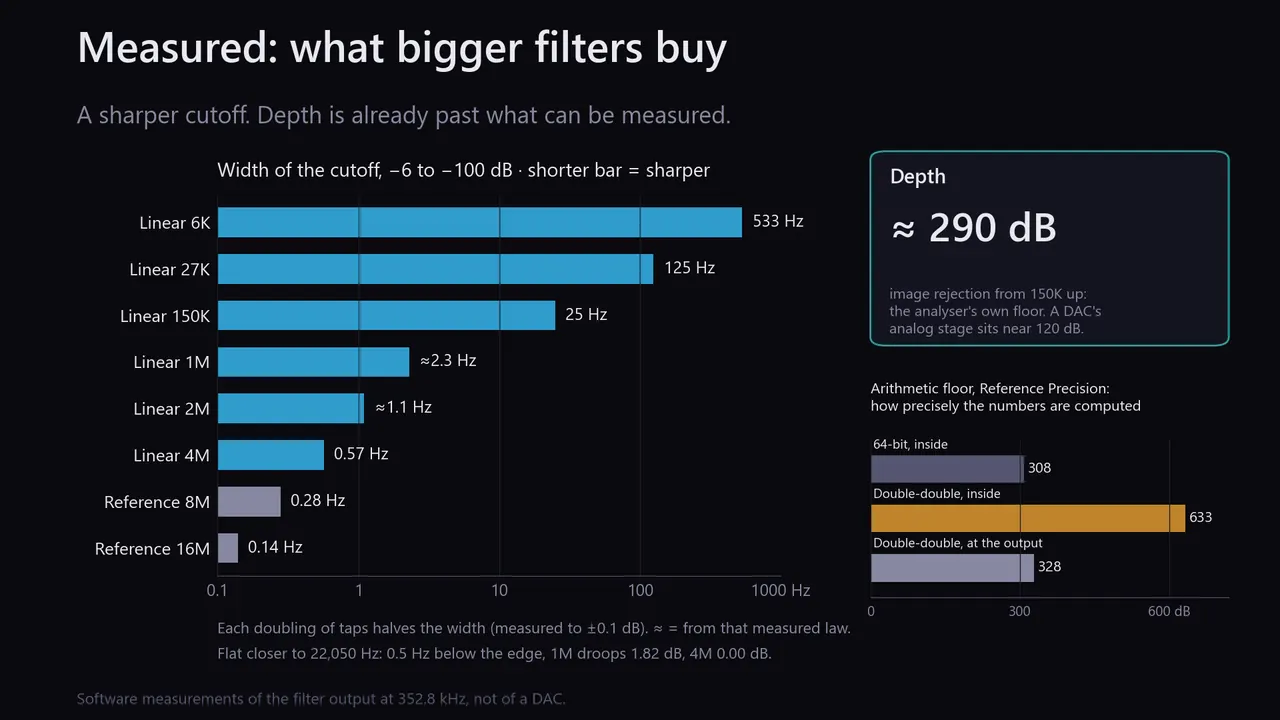
Measured cutoff width from 533 Hz at 6K to 0.14 Hz at 16M; depth about 290 dB from 150K up, the analyser's floor; Reference Precision arithmetic floor 633 dB inside, 328 dB at the output.
Measured cutoff width: 0.57 Hz at 4M, 0.28 Hz at 8M, 0.14 Hz at 16M taps.
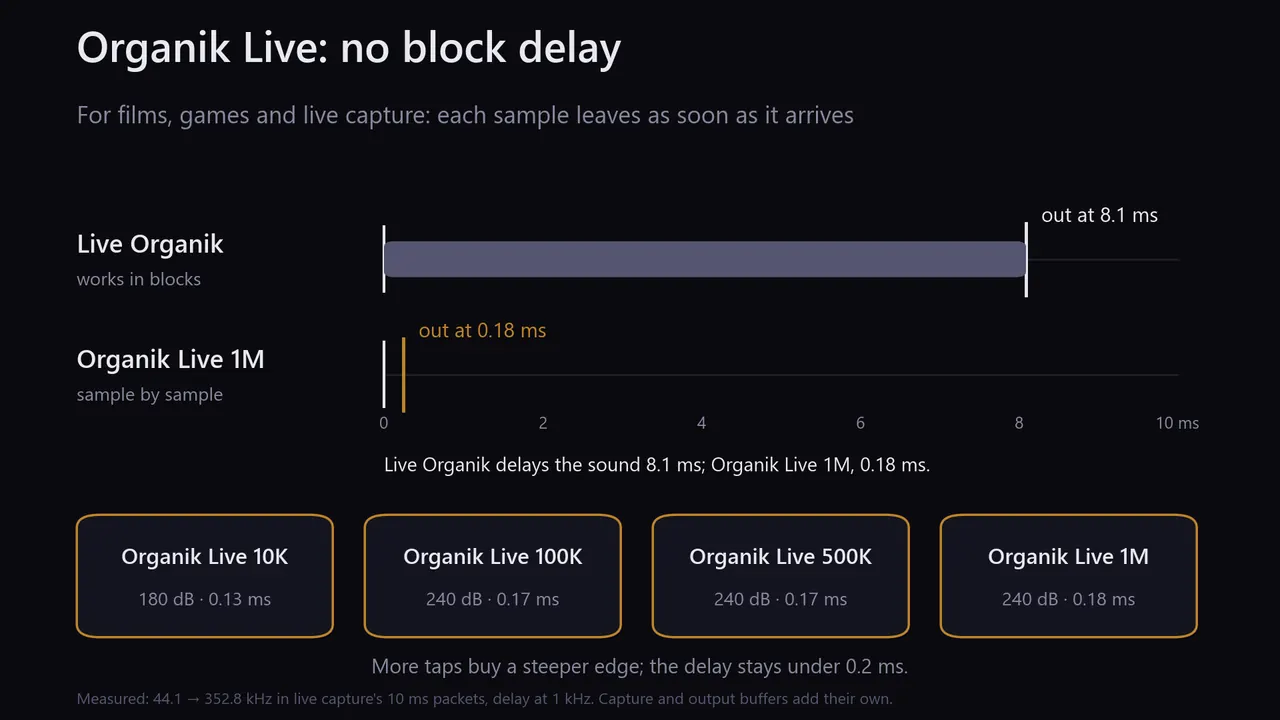
Measured from a 44.1 kHz source: Live Organik, which works in blocks, delays the sound 8.1 ms; Organik Live 1M delays it 0.18 ms. Organik Live 10K, 100K, 500K and 1M all stay under 0.2 ms.
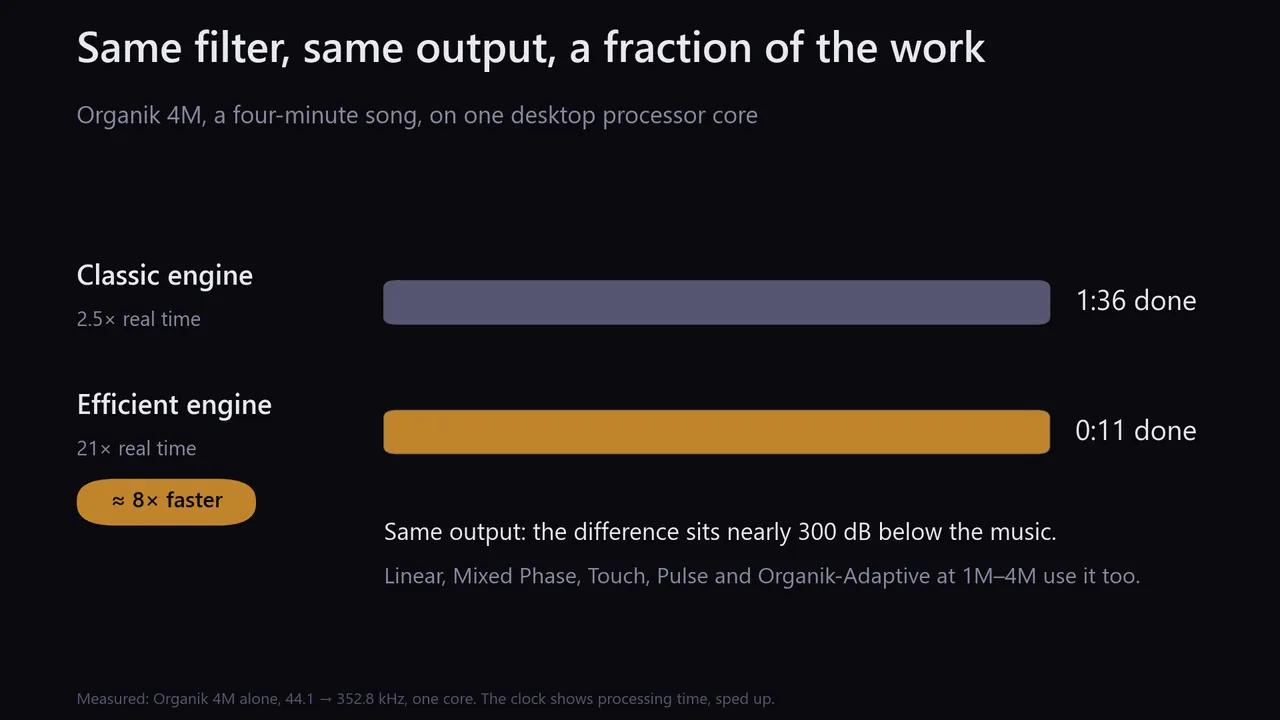
A four-minute song: 1:36 of work on the Classic engine, 0:11 on the Efficient engine.
Every filter, measured: the full tables from the app

Every filter runs in 64-bit floating point (Reference Precision in double-double), with coefficients made for the exact rate ratio. Tap count sets how sharp the cutoff is, not how good the filter is. Figures on this page are software measurements of the filter output, not DAC measurements or listening results.

Linear

Linear phase: ringing spreads evenly before and after each transient, with the same delay at every frequency.

6K – 4M taps

Organik

Minimum phase: the same frequency response as Linear, with its ringing moved after the transient.

6K – 4M taps

Mixed Phase

A fixed point between the two (α = 0.25): very little ringing before a transient, longer ringing after it than Linear.

6K – 4M taps

Organik Touch & Pulse

Organik with a fast path for attacks. Touch sends the first 20 ms of each detected hit through a short minimum-phase filter and plays everything else on Organik. Pulse follows longer hits and some percussive sound between them.

6K – 4M taps · +87 ms delay

Reference Precision

Linear, Organik, Organik-Adaptive and Mixed Phase DD at 4M, 8M and 16M taps, for file and server playback. DD means double-double computation, about 106-bit.

Seconds of start-up delay · heavy CPU

Low latency

For video, games and live capture. Live Linear, Live Organik and Cascade work in blocks: 3–10 ms of delay. Organik Live 10K to 1M has no block: under 0.2 ms.

765 – 1M taps

Linear or Organik?

Pick Linear for a DAC with no filter of its own (NOS, R2R), or when you want the same delay at every frequency. Pick Organik for transient-rich music, or when your DAC applies its own linear-phase filter: two linear-phase filters in a row add their pre-ringing, minimum phase adds almost none. Not sure? Start with Organik 2M.

What Bigger Filters Buy, Measured

A sharper cutoff. The step from full level to 100 dB down narrows from 533 Hz at 6K to 25 Hz at 150K, about 2.3 Hz at 1M, 0.57 Hz at 4M and 0.14 Hz at 16M. Each doubling of taps halves it, so the band stays flat closer to 22,050 Hz: half a hertz below the edge, 1M is down 1.82 dB and 4M not at all. Depth is already past what can be measured: from 150K up, images sit about 290 dB down, the analyser's own floor, so sizes cannot be ranked by depth. A typical DAC's analog stage sits near 120 dB. Reference Precision's arithmetic floor, about 633 dB inside and 328 dB at the output, is how precisely the numbers are computed, not what the filter removes.

Reference Precision

Each doubling of taps halves the width of the cutoff: 0.57 Hz at 4M, 0.28 Hz at 8M, 0.14 Hz at 16M. For file and server playback; not for live capture.

Organik Live

For video, games and live capture. Live Linear, Live Organik and Cascade work in blocks, and the sound waits for each block: 3.7 to 9.8 ms from a 44.1 kHz source. Organik Live filters each sample as it arrives, so only the filter's own delay remains: 0.13 to 0.18 ms, measured at 1 kHz. More taps buy a steeper edge. Images sit 180 dB down from 22.05 kHz with the 10K and at least 240 dB down with the 100K, 500K and 1M; across those three, the step from flat to 240 dB down narrows from 15 Hz to 3 Hz to 1.4 Hz. Every size is minimum phase. Capture and output buffers add their own delay.

Efficient Engine

Linear, Organik, Mixed Phase, Touch, Pulse and Organik-Adaptive at 1M–4M run on a faster engine with the same output (difference below −280 dB): up to about 8× faster (Organik 4M, one core). It is the default on Windows, Apple-silicon Macs, iPhone and iPad. The Classic engine stays available in Settings. Fast Start lets the largest filters start sooner; the filter's delay is unchanged.

All filter measurements current filters
FilterPhaseTapsTHD+NImage rejectionStopband floorTo −100 dBWorst caseDelayRing pre / post (ms)
Low latency
CascadeLinear765< −150108.8315.03,020 Hz137.71.1 ms0.64 / 0.64
Cascade OrganikMinimum765−94.4155.7150.03,020 Hz137.6~0.1 ms0.08 / 1.28
Live LinearLinear1.3K< −150143.1315.61,813 Hz136.21.8 ms0.97 / 0.97
Live OrganikMinimum1.3K−89.0151.1145.51,814 Hz136.3~0.2 ms0.08 / 2.09
Core
Linear 6KLinear5,667−126.6202.4343.6533 Hz201.68.0 ms2.57 / 2.57
Linear 27KLinear27,267−120.4259.0329.9125 Hz239.838 ms5.62 / 5.62
Organik 27KMinimum27,267−116.7259.0328.7125 Hz239.9~0.2 ms0.10 / 28.7
Linear 150KLinear149,613< −150295.6316.025 Hz274.4212 ms7.07 / 7.07
Dark 176KLinear176K< −150297.6317.121 Hz280.1249 ms8.35 / 8.35
Mega
Linear 1MLinear1,000,001−118.8289.4325.9≈ 2.3 Hz †272.01.42 s7.20 / 7.20
Organik 1MMinimum1,000,001< −150291.1315.3≈ 2.3 Hz †272.5~0.2 ms0.10 / 102
Mixed Phase 1MMixed α 0.251,000,001—217.3217.212.03 Hz—1.42 s0.051 / 37.5
Linear 2MLinear2,000,001< −150287.2315.6≈ 1.1 Hz †277.32.83 s7.20 / 7.20
Organik 2MMinimum2,000,001−118.0291.1313.3≈ 1.1 Hz †277.3~0.2 ms0.10 / 103
Linear 4MLinear4,000,001< −150288.8304.10.57 Hz246.8 ‡5.67 s7.2 / 7.2
Organik 4MMinimum4,000,001< −150288.8300.00.57 Hz246.8 ‡~0 ms—
Organik Touch / Pulse 1MMin. + short path1,000,001 + 575Touch: Organik 1M between hits. Short attack path (Pulse also between hits): images 56.6 dB down+87 mspath: 0.10 / 2.43
Adaptive and R&D
Organik-Adaptive 1MAdaptive min.1,000,001 + 575< −150291 / 180315 / 305≈ 2.3 † / 3,000 Hz272 / 2808.16 ms0.10 / 102 · 0.10 / 2.43
Transient-Perfect 1MAdaptive mono.1,000,001 + 22< −150291 / 13–97315 / 56≈ 2.3 † / —272 / 11.88.16 ms0.10 / 102 · 0.03 / 0.03
KineticAdaptive149,613 + 765−121.3295.2315.8——212 ms—
Kinetic V2 300KAdaptive300,001 × 3< −150295.3316.013 Hz259.9425 ms7.18 / 7.18
Kinetic V3 300KAdaptive300,001 × 2< −150296.6317.013 Hz280.0433 ms7.18 / 7.18
Kinetic V2 1MAdaptive1,000,001< −150301.5326.1not re-measured272.21.42 s7.20 / 7.20
Kinetic V3 1MAdaptive1,000,001 × 2−127.1303.2329.4not re-measured292.31.43 s7.20 / 7.20
Reference Precision (double-double) ♦
Linear / Organik 4MLinear / Min.4,000,001< −150288.83280.57 Hz246.8 ‡5.67 s / ≈07.2 / 7.2 · <0.1 / long
Kinetic V3 4MAdaptive4,000,001 × 2< −150288.83280.57 Hz246.8 ‡5.67 s7.2 / 7.2
Organik-Adaptive 4MAdaptive min.4,000,001 + 575< −150288.83280.57 Hz246.8 ‡≈0<0.1 / long
Linear / Organik 8MLinear / Min.8,000,001< −150289.43280.28 Hz240.7 ‡11.34 s / ≈07.2 / 7.2 · <0.1 / long
Organik-Adaptive 8MAdaptive min.8,000,001 + 575< −150289.43280.28 Hz240.7 ‡≈0<0.1 / long
Linear / Organik 16MLinear / Min.16,000,001< −150288.13280.14 Hz234.7 ‡22.68 s / ≈07.2 / 7.2 · <0.1 / long
Organik-Adaptive 16MAdaptive min.16,000,001 + 575< −150288.13280.14 Hz234.7 ‡≈0<0.1 / long
  • Software measurements of the filter output at 352.8 kHz, not of a DAC. dB figures: higher is cleaner.
  • THD+N “< −150”: below this campaign's detection floor.
  • Image rejection: how far upsampling's mirror images sit below the music. From 150K up, readings sit at or near the analyser's floor; a few dB between sizes is measurement scatter, not filter quality.
  • Stopband floor: rounding noise between images, relative to a 1 kHz tone. It depends on how the engine computes, not on how well the filter removes images, and the rows come from more than one measurement tool.
  • To −100 dB: width of the cutoff, from the passband edge to 100 dB down. Smaller is sharper; compare sizes here. † From the measured 1/N law within the Mega family (each doubling of taps halves the width, to ±0.1 dB), scaled from the 4M width.
  • Worst case: the worst point found anywhere in the stopband. ‡ 4M–16M measured with a different tool.
  • Delay: a one-time start-up delay for music; minimum phase is close to zero. Ring: time above −60 dB before and after the impulse peak.
  • Adaptive rows: sustained path / transient path. Transient-Perfect is R&D: its blend has a measured −26.77 dB notch near 15.62 kHz.
  • ♦ Reference Precision computes in double-double: delivered numerical floor about 328 dB, internal about 633 dB.
  • Dark 176K rolls off from about 18.7 kHz on purpose.

Mixed Phase

Each Mixed Phase preset is one fixed filter at α=0.25: one convolution path, no transient detector and no crossfade. Mixed Phase DD adds the same choice at 4M, 8M and 16M.

PresetTapsPeak delayAt 352.8 kHzDense ×8Image ×8Impulse pre / postStep pre / post
Mixed Phase 6K6,0013,000 samples8.50 ms—124.286 dB1.732 / 6.117 ms0.122 / 4.779 ms
Mixed Phase 27K27,00113,500 samples38.27 ms123.42 dB123.42 dB0.048 / 16.735 ms0.048 / 9.430 ms
Mixed Phase 150K150,00175,000 samples212.59 ms167.80 dB169.31 dB0.051 / 30.544 ms0.051 / 13.869 ms
Mixed Phase Extended 500K500,001250,000 samples708.62 ms—199.05 dB——
Mixed Phase 1M1,000,001500,000 samples1.417 s217.16 dB217.25 dB0.051 / 37.523 ms0.051 / 14.195 ms
Mixed Phase 2M2,000,0011,000,000 samples2.834 s235.21 dB235.61 dB0.051 / 37.163 ms0.051 / 14.470 ms
Mixed Phase 4M4,000,0012,000,000 samples5.669 s253.25 dB254.42 dB0.051 / 37.299 ms0.051 / 14.493 ms

Measured at x2, x4, x8, x16 and x32 for all seven depths. Every Mixed Phase depth rejects images by at least 120 dB at every rate. The worst results: Mixed Phase 6K 124.286099 dB at native x8 (124.286 dB), Mixed Phase Extended 500K 196.254044 dB at x32 (196.25 dB). At 1M ×8: 217.16 dB dense-stopband rejection, 217.25 dB at the 21→23.1 kHz image, 0.000000857 dB largest passband error and 0.181 ms group-delay spread; the impulse stays above −60 dB for 0.051 ms before and 37.523 ms after its peak, the step for 0.051 ms before and 14.195 ms after; 20 ms before the peak it sits at −105.19 dB.

Advanced and R&D filters 5 families
  • Organik-Adaptive: two minimum-phase paths blended on transients; partial blends stay within ±0.1 dB up to 20 kHz.
  • Kinetic V3: blends a linear-phase anchor toward a mixed-phase one on detected transients; the moving blend has measured a −16.6 dB dip below both endpoints near 20.4 kHz. R&D.
  • Kinetic: a 149,613-tap Linear path and a 765-tap path, crossfaded on transients, never louder than either path.
  • AURORA: per-band transient handling. Preview.
  • Transient-Perfect: a monotone step response at its short end; the blend has a measured −26.77 dB notch near 15.62 kHz. R&D.

Desk and pocket

One engine on your desk, in your pocket, and around the house.

The same filters run on Windows, Mac, iPhone and iPad. Each one plays to a DAC you plug in, or streams over Wi-Fi to the UPnP network streamers you already own.

On your desk

Windows and Mac: up to 4M taps live and 16M for files, to your USB DAC through ASIO, WASAPI or Core Audio, or to Diretta on Windows.

Windows & Mac

In your pocket

iPhone up to 1M taps, M-series iPad up to 4M, out to a USB-C DAC. Free below 500,000 taps.

iPhone & iPad

Around the house

Stream over Wi-Fi to any UPnP network streamer, from the computer or the iPhone. Or let a UPnP app such as mconnect send its music through HeadMania, and steer the computer from your phone.

All platforms
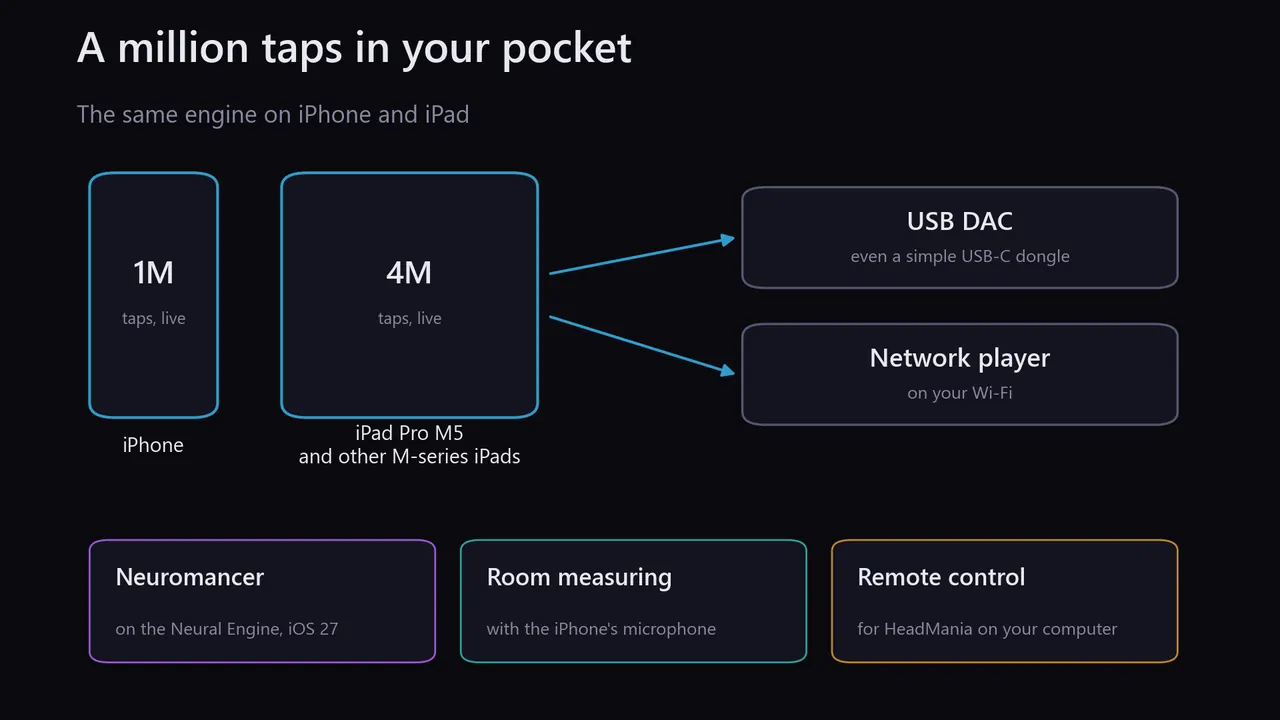
1M taps on iPhone, 4M on iPad Pro M5 and other M-series iPads.
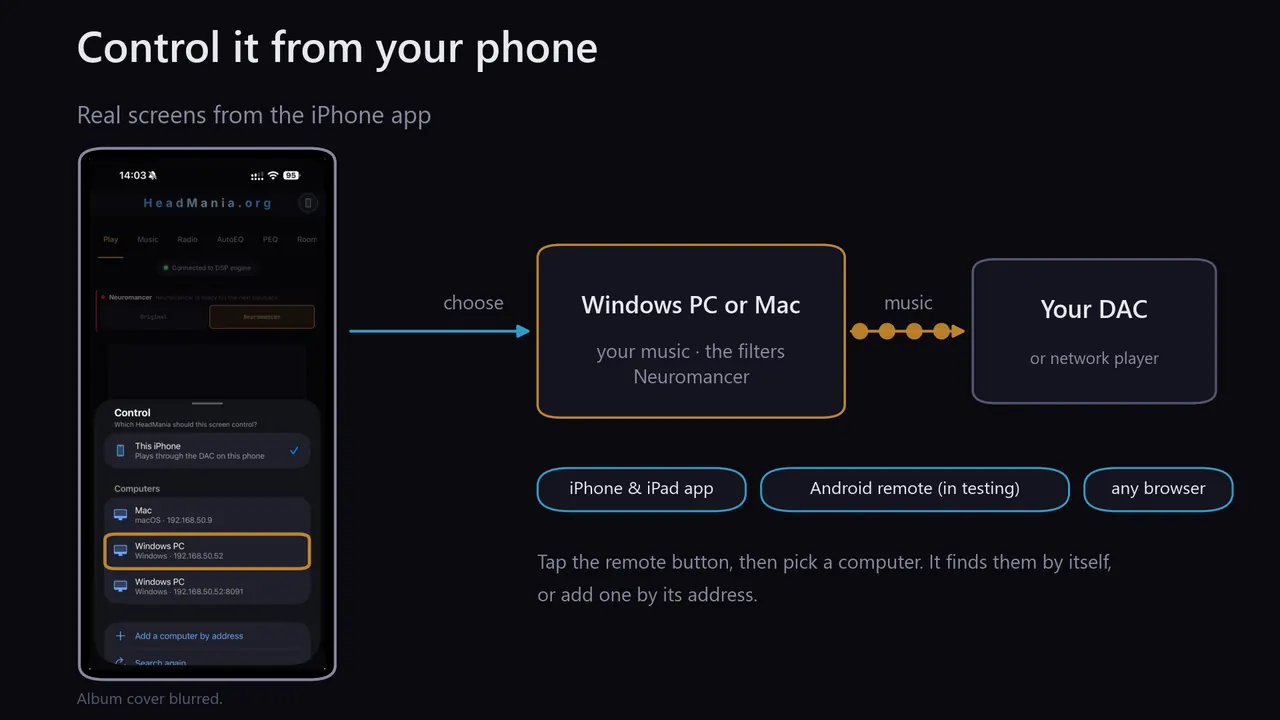
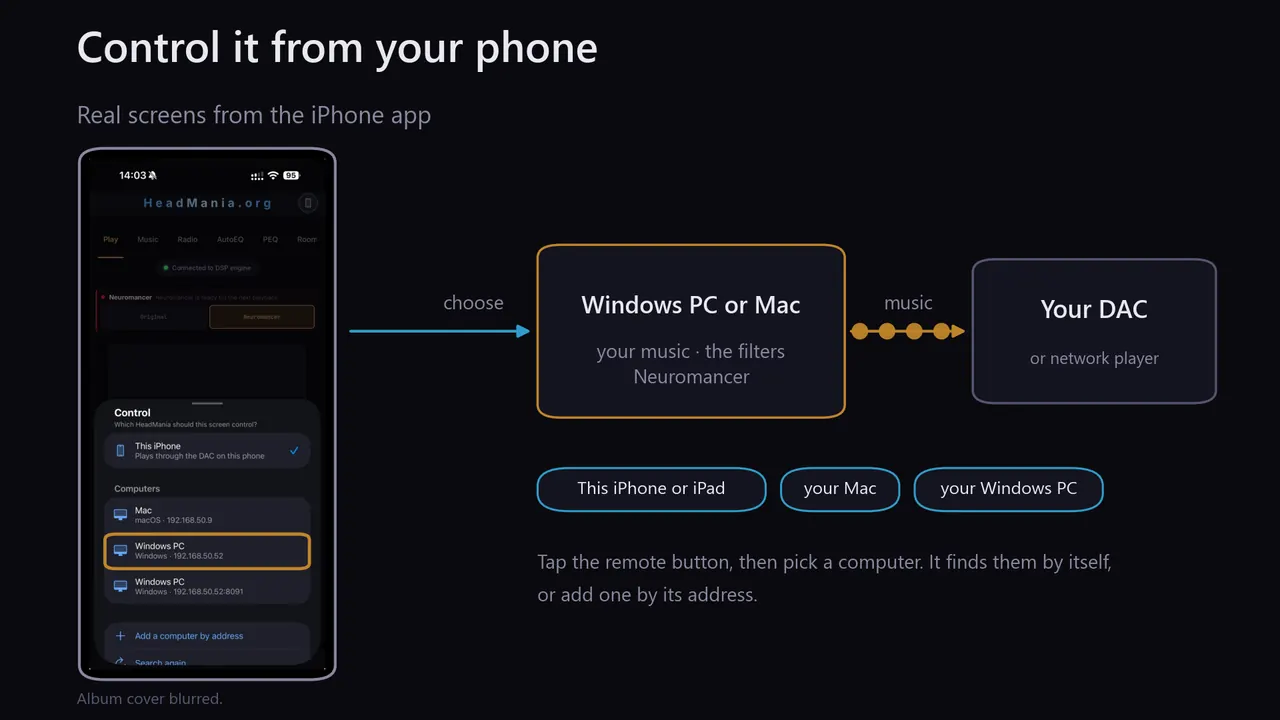
A phone picks HeadMania on the network, chooses music, and the computer plays it to the DAC.
The iPhone app's Control sheet: this iPhone, or a Mac or Windows PC on the network.
More detail, from the app

Start the server and HeadMania becomes a music server for your home: any browser on your network opens the full app at your computer's address, port 8080. The iPhone and iPad app finds your computer by itself and controls it, and so does HeadMania.org Remote for Android, now in Google Play testing. The phone chooses; the computer plays.

Android remote: to join the test, ask in the Telegram group, or join the testers group and open the Google Play test on your phone.

This app can also control HeadMania on your Windows or Mac computer: tap the remote button, pick a computer, and its library, filters and settings appear here. It finds computers on your network by itself, or you add one by address. The computer plays; this device chooses.

The same engine on iPhone and iPad: 1 million taps on iPhone and 4 million on iPad Pro M5 and other M-series iPads, live, to a USB-C DAC or a network streamer. It also measures your room with the iPhone's microphone and remote-controls HeadMania on your computer. Get it on the App Store.

Your music

Play what you own, and what you stream.

Your own files and CUE albums, HIGHRESAUDIO with your subscription, lossless radio checked station by station, or the sound of any other app. A UPnP app such as mconnect can send its music through HeadMania too.

Your library

Add folders and files; albums, CUE sheets and a library view that opens straight to your albums.

All platforms

A NAS or shared folder

Add a network share as a library folder (on Windows, \\server\share). Network tracks play, seek and stop like local files; a sleeping NAS shows "Waking up…" instead of a frozen app, and Windows' own sign-in window keeps your password away from HeadMania.

Windows & Mac

Lossless radio

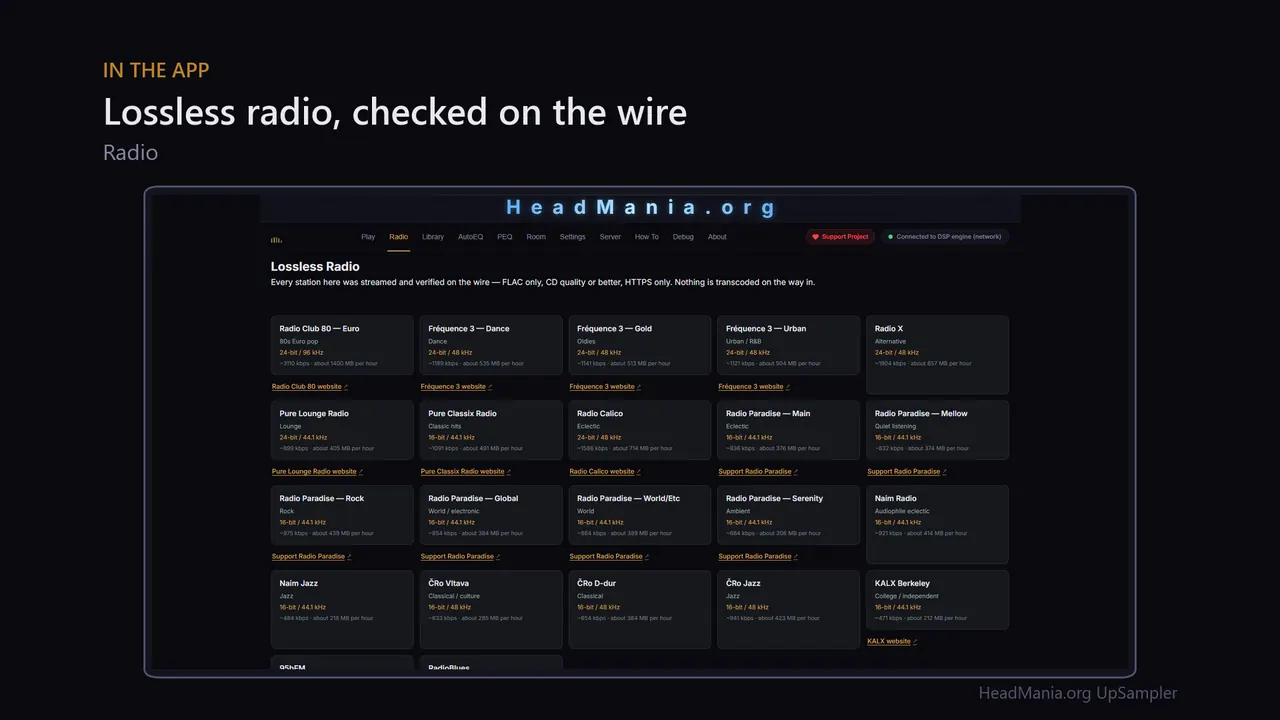
Stations checked on the wire: FLAC only, CD quality or better, over HTTPS. Each one shows its format and data use.

All platforms

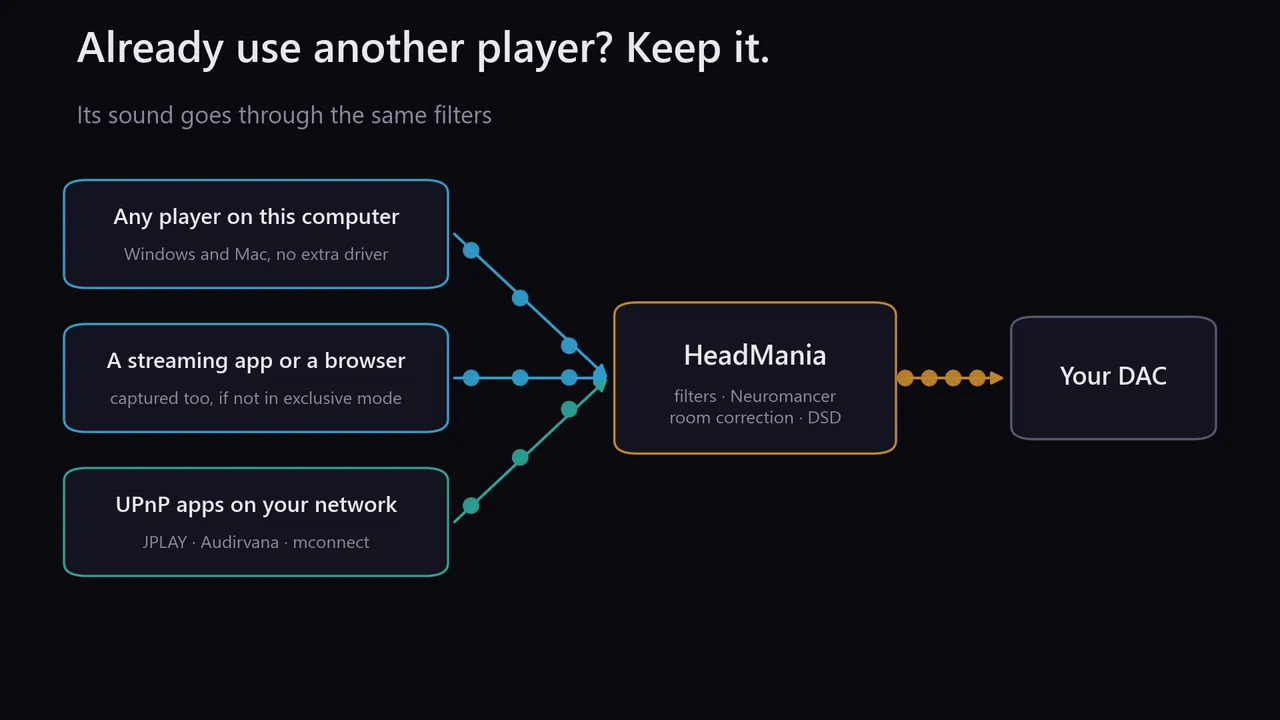
Any other app

Capture what another player, a browser or a game plays and send it through the filters. With Organik Live the filter itself adds under 0.2 ms; the capture's own buffers add tens of milliseconds.

Windows & Mac

UPnP apps

HeadMania is a network renderer too: mconnect, JPLAY and other control apps send their music through it.

All platforms
The Lossless Radio tab: a grid of stations, each with its format and data use per hour.
Any player, a streaming app or a UPnP app, through HeadMania to the DAC.
More detail, from the app

Library

Your folders, playlists and CUE-sheet albums, as tracks. The app window and every browser on your network see the same library, and folders can be added from a phone.

Lossless radio

Every station is checked on the wire: FLAC, CD quality or better, HTTPS only. Each shows its data use per hour.

Any app

On Windows and macOS, HeadMania can capture what other apps play, such as a streaming service or a browser, and filter it on the way to your DAC.

UPnP apps

JPLAY, Audirvana, mconnect and other UPnP apps can send music straight to HeadMania as a network renderer.

Your files

Play files in place from the device, iCloud Drive or Files, or copy them over with AirDrop or USB: FLAC, WAV, ALAC, AIFF, MP3, and CUE albums.

Lossless radio

Every station is checked on the wire: FLAC over HTTPS. A switch decides whether radio may use mobile data.

UPnP apps

JPLAY, mconnect and other control points send music to HeadMania on this device.

Trade-off: captured audio has already passed through the system mixer, so capture improves the output path only. UPnP apps keep the mixer out entirely.

Out to your DAC

Your DAC, wired or over the network.

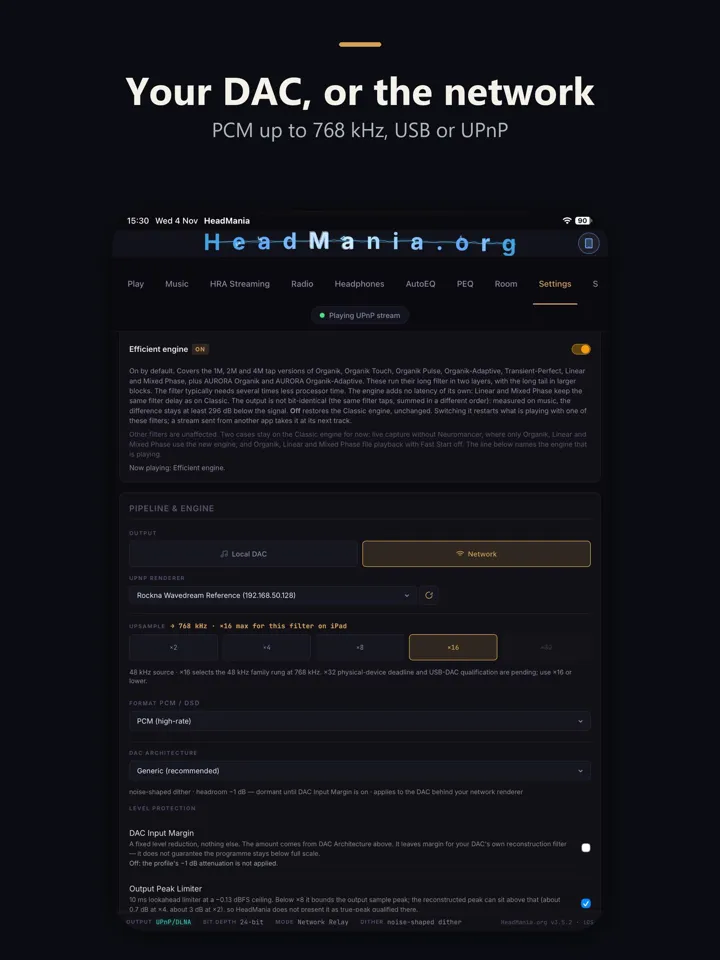
A USB DAC on Windows and Mac, Diretta on Windows, a USB-C DAC on iPhone and iPad, or any UPnP streamer over Wi-Fi. PCM from ×2 to ×32 on Windows and Mac, and up to ×16 on iPhone and iPad: 768 kHz from a 48 kHz source. DSD from HeadMania's own modulator up to DSD512, DSD1024 on Windows with native ASIO, and DSD2048 as an experiment on Windows. iPhone and iPad send DSD to a UPnP streamer that accepts it; over USB-C they send PCM.

PCM up to times 32 and DSD up to DSD2048.
Outputs and the DSD tables, from the app

Local DAC

USB DACs on Windows (WASAPI exclusive or ASIO) and macOS (Core Audio).

Network streamers

Any UPnP renderer, in PCM, native DSD, or DoP for a renderer you mark as DoP-capable.

Diretta

On Windows, a Diretta target as a third output. Needs the Diretta Host plugin.

USB-C DAC

Plays PCM to a connected USB-C DAC. DSD over USB is not yet available on iPhone and iPad.

Network streamer

Relays the filtered stream to a UPnP renderer. Native DSD follows what the renderer supports; DoP only for a renderer you mark as DoP-capable.

Choose ×2 to ×32 (×16 on iPhone and iPad). Your source keeps its rate family: 96 kHz ×8 plays at 384 kHz, 88.2 kHz ×8 at 352.8 kHz, and the Play tab reports any lower rate the DAC settles on.

DSD

HeadMania turns the upsampled signal into DSD with its own modulator. Send it native, or as DoP for a DAC that needs DSD wrapped in PCM; a DAC that does not understand DoP plays it as full-scale noise. An optional EC modulator (9th-order, extended compensation; off by default) lowers the noise further from DSD64 to DSD512, at up to about 1.6× the modulator's processor work. DSD1024 and DSD2048 run on Windows over native ASIO, with the standard modulator.

RateStandardEC modulatorStatus
DSD64111 dB122 dBRegular
DSD128154 dB174 dBRegular
DSD256172 dB228 dBRegular
DSD512194 dB≥ 240 dBNative only
DSD1024224 dBnot offered (processor-bound)Windows, native ASIO
DSD2048> 240 dBnot offered (processor-bound)Windows, native ASIO, AVX2 processor

In-band dynamic range of the modulator output, 1 kHz tone, 20 Hz–20 kHz. What reaches the DAC is capped near 157 dB by the interpolator, and a DAC's analog stage typically sits near 120 dB: read the ladder as headroom, not as an audible difference.

Your DACStart with
True 1-bit or hybrid multibitDSD256
R2R or NOS (e.g. Rockna, Denafrips)PCM
ESS or AKM chipPCM; the chip converts DSD internally
FPGA (e.g. Chord)PCM and the DAC's own filter

Headphones and sound shaping

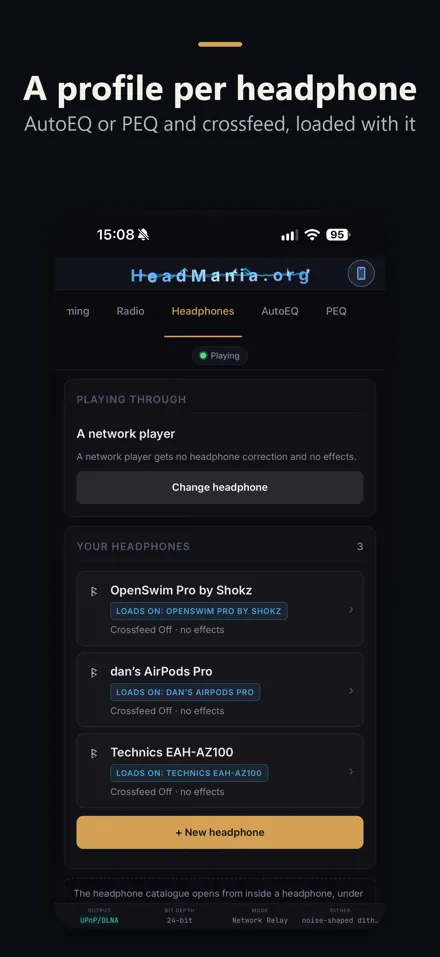
A profile for every headphone.

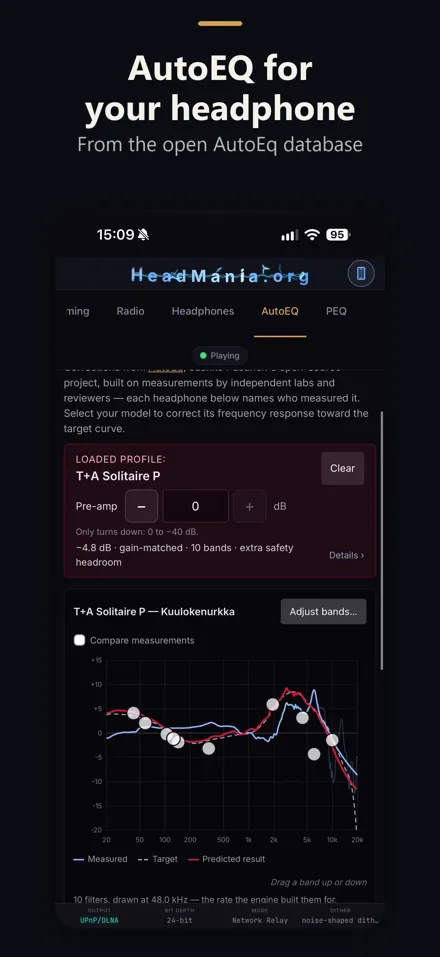
AutoEQ profiles from the open AutoEq database, your own parametric EQ, crossfeed and effects, all loaded with each headphone. Level protection guards against peaks that form between samples; DAC profiles give starting settings for your DAC type.

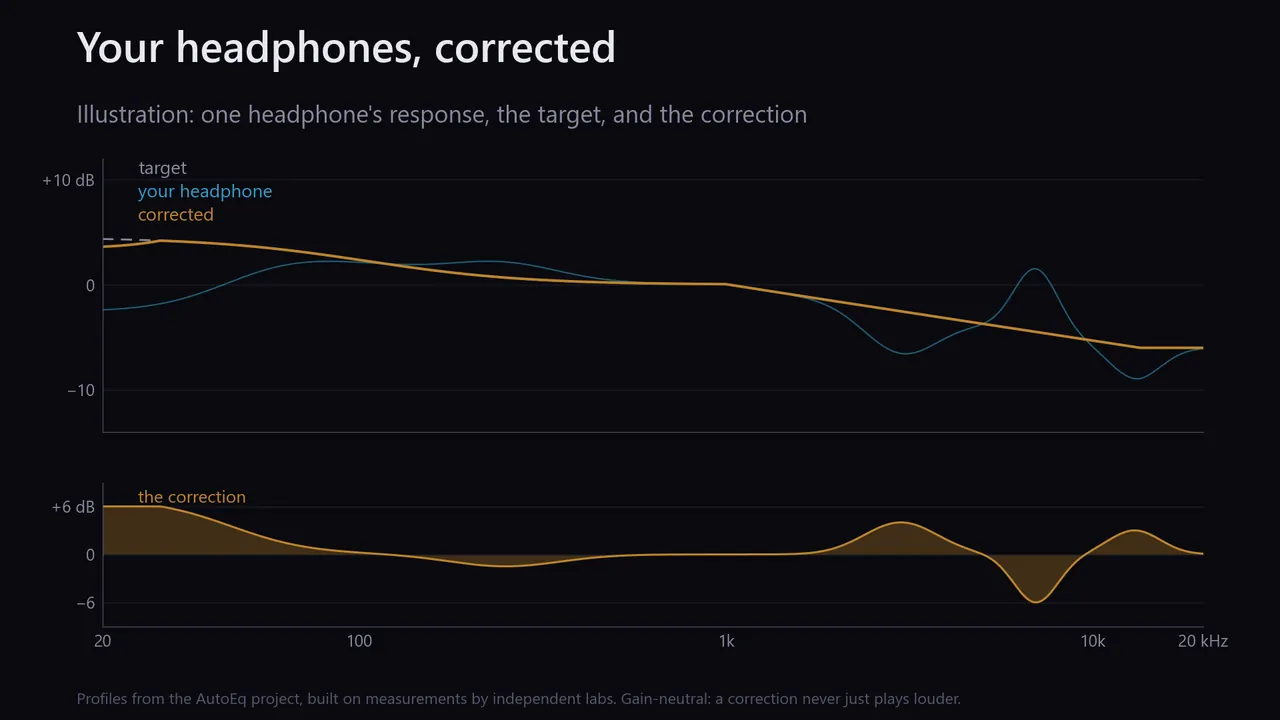
Illustration: a headphone's response, the target, and the correction that brings it there.
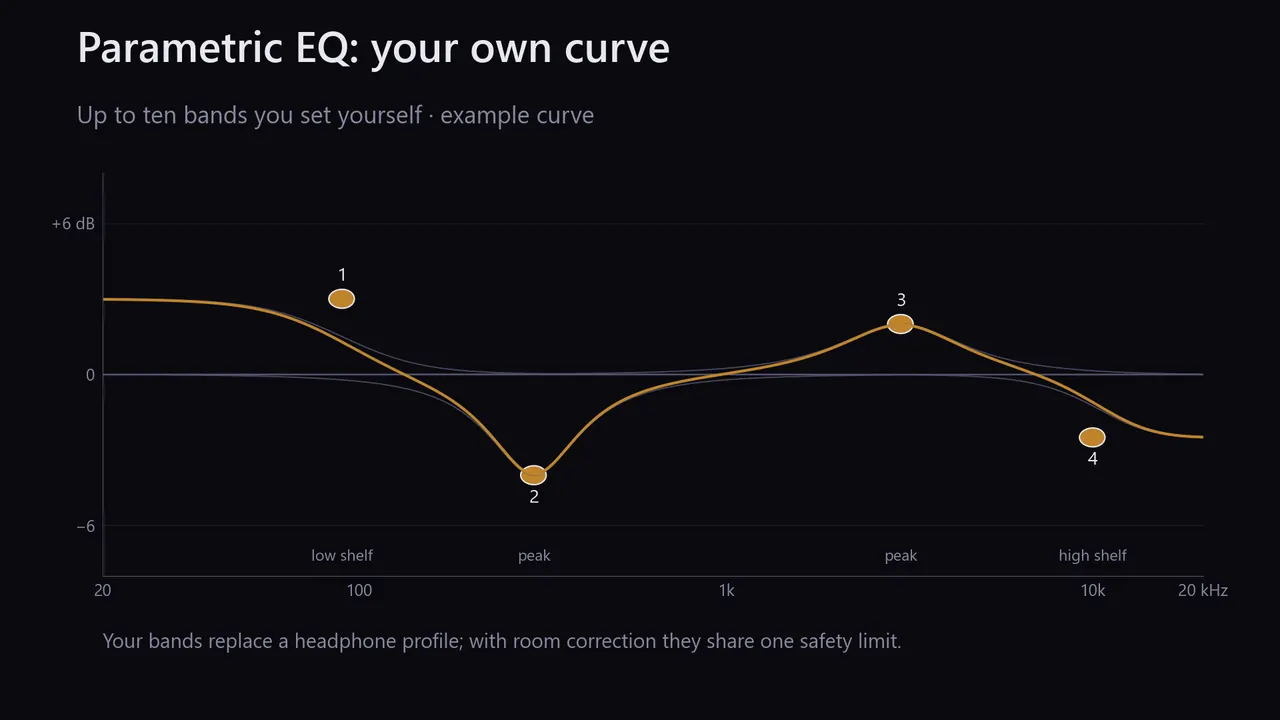
An example parametric EQ curve built from four bands.
More detail, from the app

AutoEQ corrects your headphone model with profiles from AutoEq, Jaakko Pasanen's open-source project built on measurements by independent labs; each profile names its lab. Compare measurements, fine-tune bands by number, and filter by over-ear or in-ear. Corrections are level-neutral.

Parametric EQ gives you ten bands to set yourself. Paste Equalizer APO or oratory1990 settings, save profiles, export and import them.

DSP effects

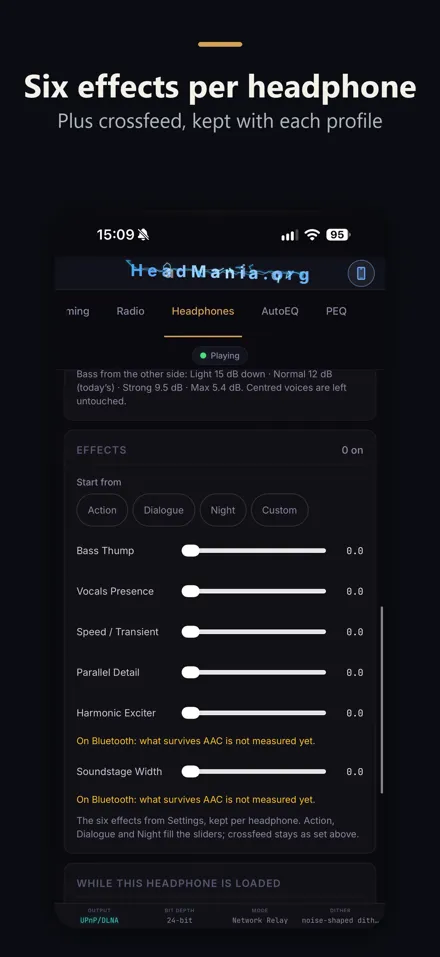
Bass Thump, Vocals Presence, Speed, Harmonic Exciter, Parallel Detail, Crossfeed and Soundstage Width. With every slider at zero they are bypassed and the signal is untouched.

Output limiter

Optional. 10 ms lookahead, −0.13 dBFS ceiling; true-peak qualified from ×8 (about 0.17 dB residual at ×8). On loud masters it trims dynamic range slightly.

DAC profiles

Pick your DAC type and HeadMania matches the level margin and dither: rounding for R2R at 24-bit, noise-shaped dither for delta-sigma, flat TPDF for 1-bit, none for 32-bit float.

Real-time profiles

Action: Bass 0.60, Speed 0.20, Harmonic 0.10. Dialogue: Vocals 0.75, Detail 0.20, Bass 0.10. Night: Detail 0.80, Vocals 0.20.

What each DSP effect does
  • Bass Thump: an 80 Hz low shelf of up to 3 dB, plus a punch of up to 3 dB on kick drums, centred on the bass. Sustained bass notes get the shelf, not the punch.
  • Vocals Presence: lifts the centre channel with two peaking filters, at 600 Hz and 2.5 kHz.
  • Speed: a transient shaper: attacks rise by up to 4.5 dB and note tails fall by up to 2 dB, the same at any playback level.
  • Harmonic Exciter: adds the 2nd harmonic (8–14 kHz) of the 4–7 kHz band, about 30 dB below it at full setting. Off for sources below 44.1 kHz.
  • Parallel Detail: upward compression: passages below −24 dBFS are lifted by up to 4 dB; louder passages, and hiss below −72 dBFS, are left alone.
  • Crossfeed: for headphones, each ear hears a 700 Hz low-passed share of the difference between the channels, 12 dB down in the bass. Centred sound is left untouched.
  • Soundstage Width: raises the sides by up to about 3 dB, most around 1.2 kHz; the centre and the bass are left untouched, so wide recordings can play slightly louder.

No black box

Always see what's running.

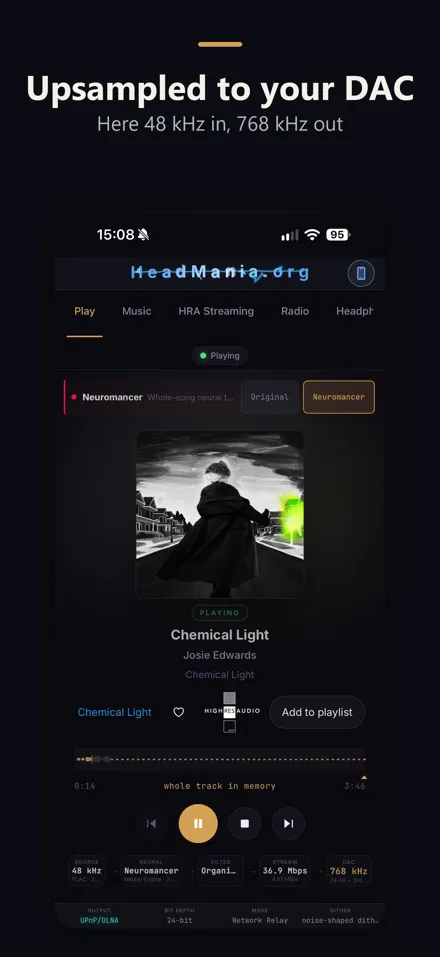
The Play tab shows the filter, rate and engine actually running, any step-down and why, and the reason a stream stopped.

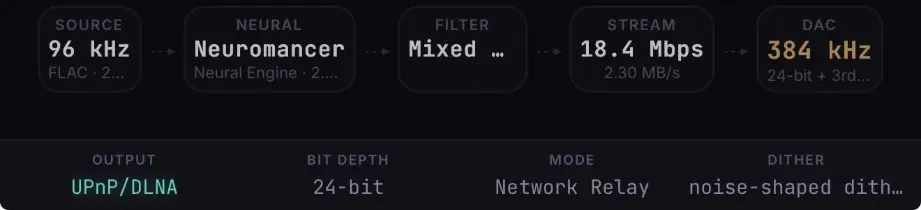
The Play tab's signal chain on iPhone: source 96 kHz FLAC, Neuromancer on the Neural Engine, Mixed Phase filter, stream rate, DAC at 384 kHz, 24-bit, noise-shaped dither.
More detail, from the app

The Play tab shows the filter, rate and engine actually running, any step-down and why, peaks above full scale on the waveform, and the reason a stream stopped. The performance panel shows real-time headroom with processor, graphics and memory use, and the Debug tab copies or saves a log for support.

Neuromancer · Room correction

Innovation Labs: where HeadMania goes beyond upsampling.

Two stages that go beyond the upsampling filter. Neuromancer, a neural model with 8.5 million learned values, reshapes the music as it plays, before the filter, on your graphics card or the Neural Engine. Room correction simulates your speakers and seat in 3-D from the floor plan alone, then cuts your room's bass peaks with a measurement from an iPhone or a calibrated microphone. Both are optional and clearly marked: Neuromancer is experimental, room correction is in testing.

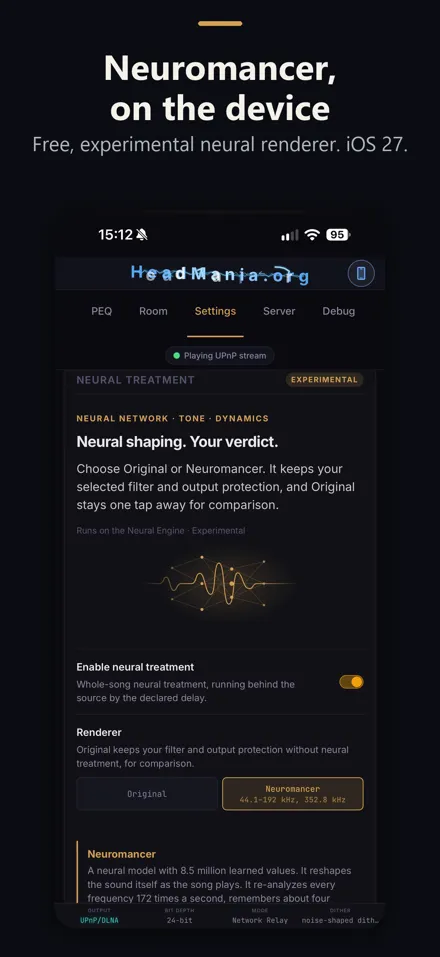
Neuromancer Experimental

Reshapes the sound as the song plays: about 730 billion operations for every second of music, on your graphics card or the Neural Engine. The app tests your device first, and Original, which plays the track untouched, stays one tap away.

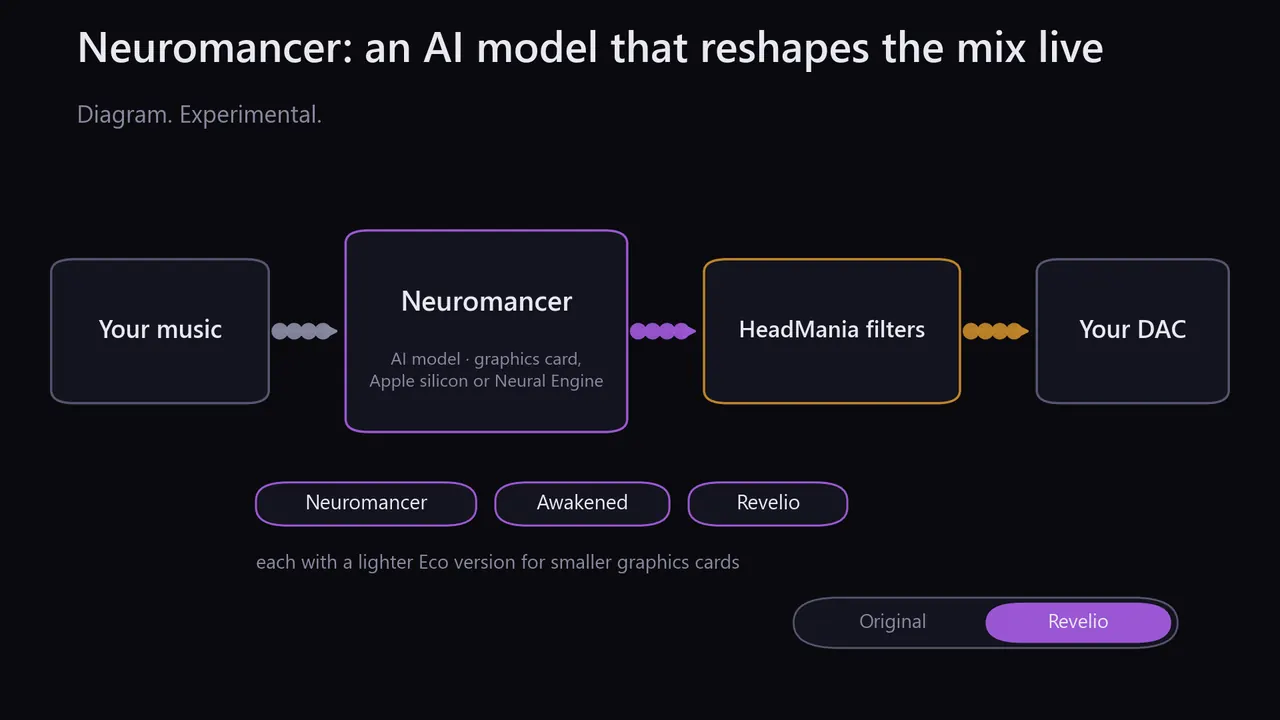
Neuromancer sits before the filters; three models; the Original and Revelio switch.
730 billion operations for every second of music; per 255 ms of music, up to 93 ms on iPhone 18 Pro Max and 14.5 ms on an RTX 5090.
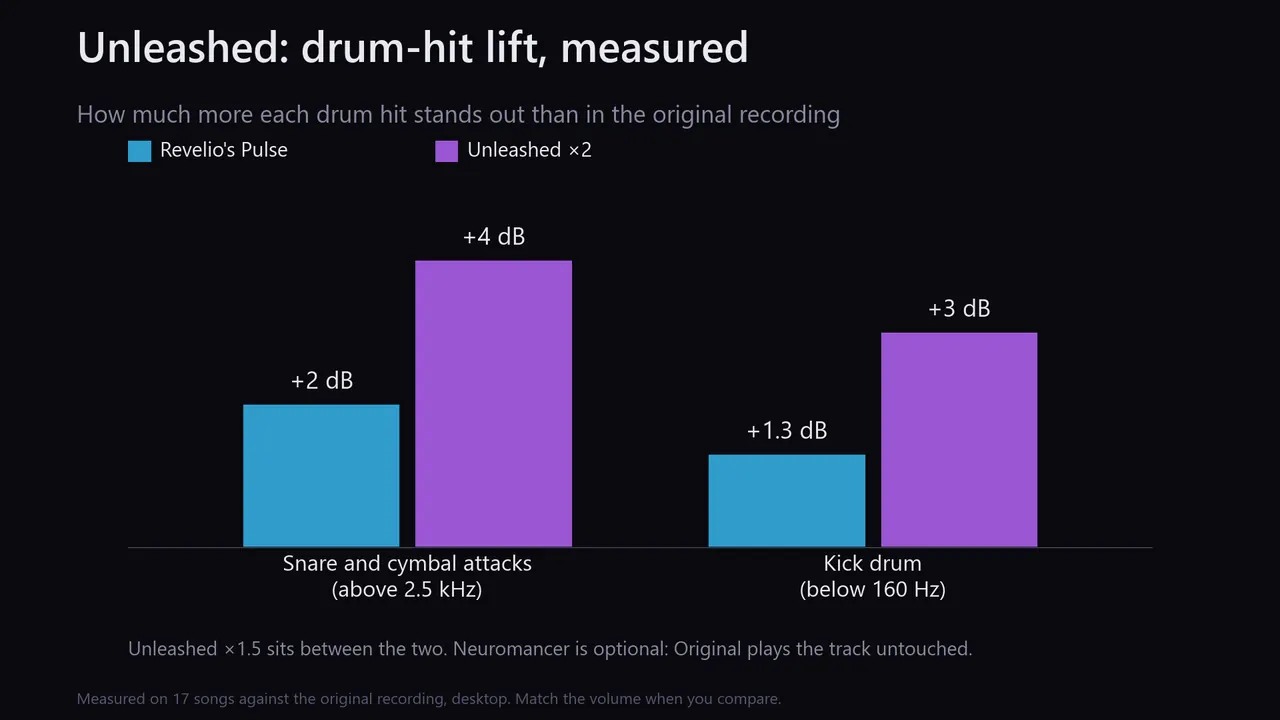
Drum-hit lift against the original: Pulse +2 dB and Unleashed x2 +4 dB on snare and cymbal attacks; +1.3 and +3 dB on the kick drum.
More detail, model credits and licence

Neuromancer is an optional neural stage, a model with 8.5 million learned values, that reshapes the sound as the song plays, before the upsampling filter. Choose Neuromancer, Awakened or Revelio, each with a lighter Eco version. With Revelio, Revelio's Pulse lifts drum attacks above 2.5 kHz and Unleashed shapes them in three bands. It changes the signal on purpose; Original plays the track untouched.

At full size it runs about 730 billion operations for every second of music and re-analyses every frequency 172 times a second. Measured on our test devices, an NVIDIA RTX 5090 processes a quarter-second of music in 14.5 ms (17× faster than real time) and an iPhone 18 Pro Max in up to 93 ms (2.7×). The Eco models need much less.

Runs on a Windows graphics card (it tests the card first; on NVIDIA cards an optional pack of about 1 GB speeds it up) or an Apple-silicon Mac with macOS 27. Neural Master is a lighter option that sets a few controls once per track.

Free, and not part of Signature Edition. Runs on the Neural Engine and processor, with iOS or iPadOS 27.

Trade-off: tracks start about 2.75 s late (about 0.3 s more above 44.1 kHz). Until a test shows the device keeps up in real time, tracks play untreated. It accepts sources from 44.1 to 192 kHz, and 352.8 kHz.

Measured: how much Revelio's Pulse and Unleashed lift drum hits
Model credits and licence

Every Neuromancer model was trained on recordings from:

  • MedleyDB and MedleyDB 2.0 — R. Bittner, J. Salamon, M. Tierney, M. Mauch, C. Cannam, J. P. Bello, “MedleyDB: A Multitrack Dataset for Annotation-Intensive MIR Research”, ISMIR 2014; R. Bittner et al., “MedleyDB 2.0: New Data and a System for Sustainable Data Collection”, ISMIR 2016 (late-breaking demo). Licensed CC BY-NC-SA 4.0.
  • HiMMP — Heaviness in Metal Music Production (mixes by the named producers). Licensed CC BY 4.0.
  • MoisesDB — I. Pereira, F. Araújo, F. Korzeniowski, R. Vogl, “Moisesdb: A dataset for source separation beyond 4-stems”, arXiv:2307.15913, 2023, https://github.com/moises-ai/moises-db. Licensed CC BY-NC-SA 4.0.

Neuromancer Awakened and Neuromancer Revelio were also trained on stereo masters from:

  • AlbumDB — T. McKenzie, E. Moliner Juanpere, A. Wright, “AlbumDB: A multitrack dataset of a ten-song album with stereo and immersive 7.1.4 masters” (music: “Extraordinary” by Tom McKenzie), Zenodo 2026, https://doi.org/10.5281/zenodo.19683001. Licensed CC BY 4.0.
  • OnAir Music Dataset — stem projects by OnAir Music, https://github.com/sevagh/OnAir-Music-Dataset. Licensed CC BY-SA 4.0.

To the extent a trained model is an adaptation of that material, these model files are offered under the Creative Commons Attribution-NonCommercial-ShareAlike 4.0 International licence: https://creativecommons.org/licenses/by-nc-sa/4.0/. They are distributed free of charge and must not be sold or placed behind a paywall.

Room correction In testing

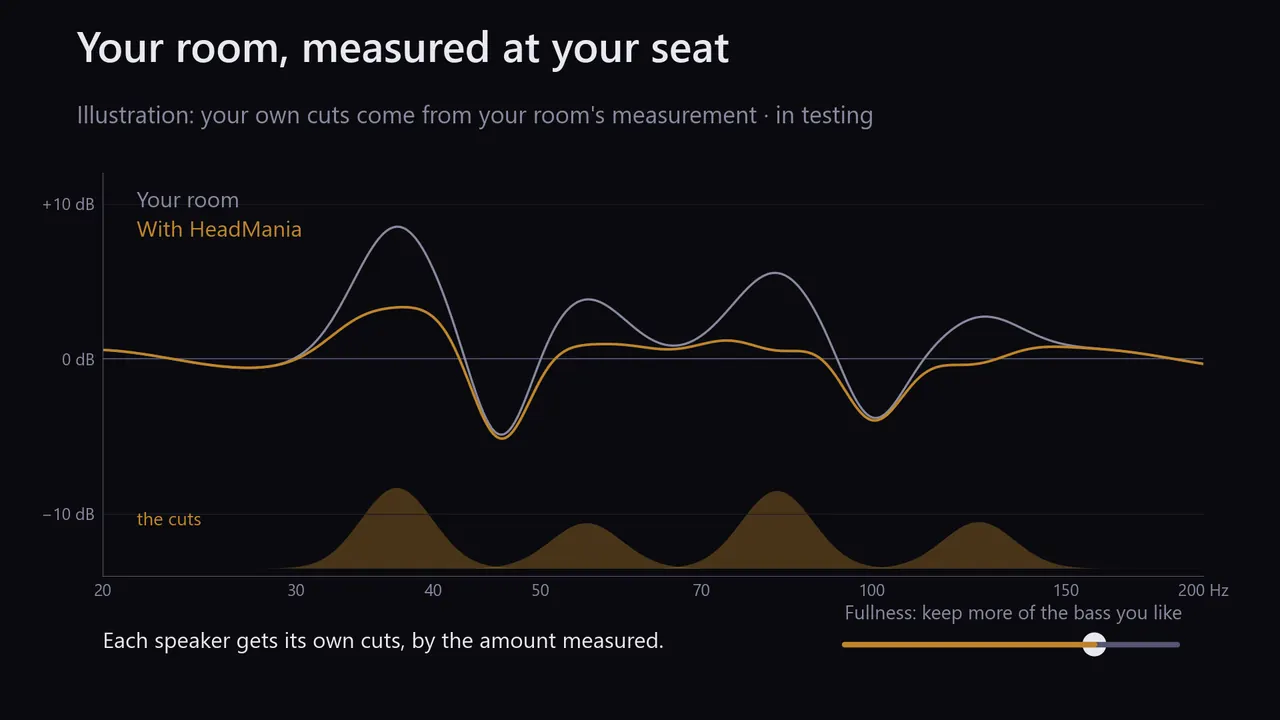
From your room's shape, speakers and seat, HeadMania simulates the sound in 3-D and ranks where the speakers and the seat could go. Measure with an iPhone or a calibrated microphone, and it cuts the room's bass peaks.

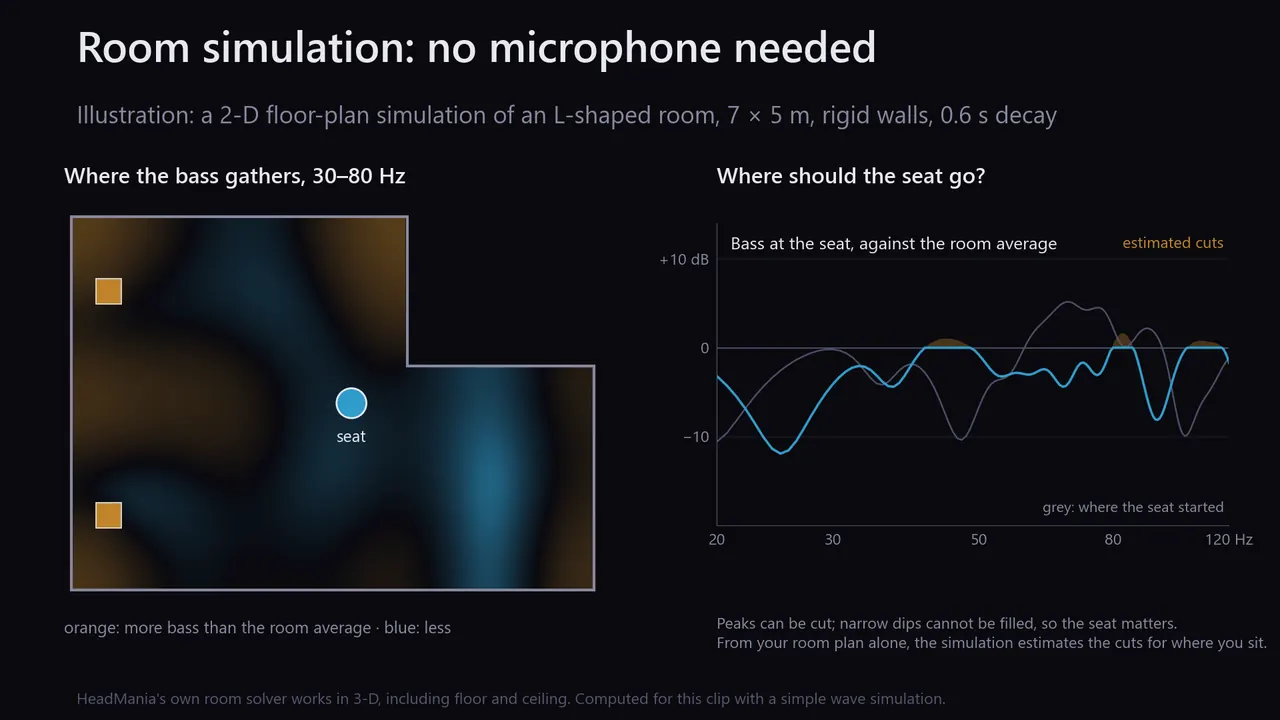
Illustration: a simulated room's bass resonances, a better seat, and the estimated cuts.
Illustration: a measured room curve and the cuts applied to its peaks.
More detail, from the app

Two independent routes. Simulate: from your room's shape, size, speaker positions and seat, HeadMania simulates the sound travelling from both speakers to your listening spot in 3-D, at ear height. It ranks where the speakers and the seat could go, and estimates a correction for where you sit from the room plan alone, with no microphone. Measure: record your speakers at the seat with the iPhone's microphone, or an external measurement microphone and its calibration file. Sweeps play through a local DAC or a UPnP streamer on a computer, and through a UPnP streamer on iPhone and iPad; HeadMania allows for the network's delay. Either way, the correction cuts the room's bass peaks. Rooms can be saved and moved between devices.

Status: the Room tab is still in testing. Ringing reduction is a preview: calculated, not yet applied.

Feature index

Everything else it does.

Server mode

Run HeadMania on a PC or Mac as your network audio processor; browse and play your library and HIGHRESAUDIO from a browser or the iPhone app.

Windows & Mac

The server keeps playing

Whole albums and lists play on from the computer while your phone sleeps.

Windows & Mac

Native DSD to UPnP players

Native DSD where the player accepts it, or DoP for a player you mark as DoP-capable, from the computer, the iPhone or the iPad.

All platforms

Diretta

A Diretta target as a third output, next to your DAC and UPnP players.

Windows

Remote control

Steer the computer from the iPhone app or any browser on your network; an Android remote is in testing.

All platforms

Lock screen

Cover art with Previous and Next; albums keep playing while the phone is locked.

iPhone & iPad

AutoEQ and PEQ

Open AutoEq profiles with pre-amp and compare; your own bands with paste, copy, save, export and import.

All platforms

Level protection

A guard for peaks that form between samples, plus an optional output limiter (−0.13 dBFS ceiling), against clipping from loud masters.

All platforms

DAC profiles

Pick your DAC type and HeadMania matches the level margin and dither: rounding for R2R, noise-shaped dither for delta-sigma, flat dither for 1-bit.

All platforms

Room tools

Simulate your room, find the best seat and speaker layout, measure with an iPhone or a calibrated microphone, reduce ringing.

In testing

Performance panel

Real-time headroom for the filter that is running, so you know what your computer can carry.

Windows & Mac

Signed updates, your call

Desktop updates are signed and install only when you choose.

Windows & Mac

Price

Free on your computer. Free below 500,000 taps on your phone.

Windows & Mac

Free

Every filter, every output and HIGHRESAUDIO with your own subscription.

iPhone & iPad

Free

Every filter below 500K taps, Neuromancer, room measuring and the remote.

Signature Edition

One payment

Adds the larger filters, up to 1M on iPhone and 4M on M-series iPads, and applies your room correction.

One payment, 30-day trial; the App Store shows the price for your country.

On Windows and Mac, unzip the download and open the app inside; after that, updates arrive in the app, signed and installed when you choose. All versions and release notes: GitHub releases.

What you need

  • Windows: Windows 11 (64-bit) with an AVX2 processor.
  • Mac: A Mac with Apple silicon.
  • iPhone and iPad: iOS 15 or later; a USB-C DAC or a network player to hear the upsampled output.
  • Neuromancer: On Windows, a graphics card (HeadMania tests it first); a Mac with Apple silicon and macOS 27; iOS or iPadOS 27 on iPhone and iPad.
Getting started and editions, from the app
  1. Allow Local Network access when iOS asks. Without it, your control-point app cannot find HeadMania. To change it later: Settings › HeadMania › Local Network.
  2. Connect a USB-C DAC, or skip this to relay to a network streamer.
  3. Keep HeadMania open while playback starts.
  4. Pick HeadMania as the renderer in your UPnP app, or play from the Music tab.
  5. Choose a filter and rate in Settings, then play.

Free: every filter below 500K taps, Neuromancer, room measuring and the remote. Signature Edition adds the larger filters, up to 4M on M-series iPads, and applies your room correction. One payment, with a 30-day trial; purchases can be restored and codes redeemed.

Spec sheet

For engineers and ears.

ItemValuePlatform
Engine64-bit floating pointAll platforms
Reference PrecisionDouble-double (about 106-bit) at 4M, 8M and 16M taps, for files and the serverWindows & Mac
Live filtersUp to 4M taps; 1M on iPhone, 4M on M-series iPadsAll platforms
Filter familiesLinear, Organik, Mixed Phase, Organik Touch & Pulse, Reference Precision, Organik LiveAll; the last two Windows & Mac
Low latencyOrganik Live 0.13 to 0.18 ms; block filters 3.7 to 9.8 ms from a 44.1 kHz sourceWindows & Mac
PCM out×2 to ×32; ×16 on iPhone and iPad (768 kHz from 48 kHz)All platforms
DSD outDSD64 to DSD512; DSD1024 over native ASIO; DSD2048 experimental (AVX2 processor)Windows & Mac; iPhone & iPad to UPnP streamers; DSD1024/2048 Windows
USB DACWASAPI exclusive or ASIO; Core AudioWindows; Mac
USB-C DACPCM to a connected USB-C DACiPhone & iPad
Network streamersAny UPnP renderer, over Wi-Fi or cable: PCM, native DSD, or DoPAll platforms
DirettaA Diretta target as a third output (Diretta Host plugin)Windows
SourcesLibrary and CUE albums, NAS or shared folder, lossless radio, other apps' sound, UPnP apps, HIGHRESAUDIOAll; NAS and capture Windows & Mac
HeadphonesAutoEq profiles, parametric EQ, crossfeed and effects per headphoneAll platforms
Output limiterOptional; 10 ms lookahead, −0.13 dBFS ceilingAll platforms
NeuromancerNeural stage with 8.5 million learned values (experimental)All platforms
Room correctionSimulate, measure, cut bass peaks (in testing)All platforms

Questions

Before you download.

Is it free?

On Windows and Mac, yes, with every filter and output. On iPhone and iPad, every filter below 500,000 taps is free, with Neuromancer, room measuring and the remote. The one-time Signature Edition adds the larger filters and applies your room correction.

What do I plug in?

A USB DAC (USB-C on iPhone and iPad), or nothing at all if you stream over Wi-Fi to a UPnP network streamer. Headphones go on your DAC. On Windows, Diretta is a third option. On iPhone and iPad, Bluetooth headphones work too, without the upsampling.

Will it work with my UPnP network streamer?

HeadMania sends to UPnP renderers in PCM at the rates your streamer accepts, native DSD where it accepts DSD, or DoP for a streamer you mark as DoP-capable.

Does iPhone or iPad play DSD?

Yes, to a UPnP network streamer: native DSD where the streamer accepts it, or DoP for one you mark as DoP-capable. Over USB-C, iPhone and iPad send PCM, up to ×16 (768 kHz from a 48 kHz source); DSD over USB is not yet available there.

What does Neuromancer need?

On Windows, a graphics card: HeadMania tests it first, and on NVIDIA cards an optional pack of about 1 GB speeds it up. On a Mac, Apple silicon with macOS 27; on iPhone and iPad, iOS or iPadOS 27, on the Neural Engine. Tracks start about 2.75 s later, and until the test shows your device keeps up, they play untreated. It is experimental, optional and free, not part of Signature Edition.

Can I use it for video and games?

Yes, with the Low latency filters. Organik Live adds 0.13 to 0.18 ms; the capture of another app's sound adds tens of milliseconds of its own.

Do I need a HIGHRESAUDIO subscription?

Only for HIGHRESAUDIO streaming. Your own music, lossless radio, other apps and UPnP apps work without one.

What about my privacy?

HIGHRESAUDIO tracks are held in memory while they play; no music is written to disk. This page sets no cookies and loads nothing from other sites. The app's privacy policy has the details.

Is there an Android app?

An Android remote for the computer is in testing on Google Play. The upsampler itself runs on Windows, Mac, iPhone and iPad.

How do updates work?

On Windows and Mac, updates are signed and install only when you choose. On iPhone and iPad, the App Store updates the app.

Which filter should I start with?

Not sure? Start with Organik 2M. Pick Linear for a DAC with no filter of its own (NOS, R2R).

In the press

What others wrote.

All press, articles and impressions

Who makes it

Made by a listener who reviews hi-fi.

HeadMania.org Upsampler is independent software by Dan Gheorghe, who reviews DACs, headphones and speakers at headmania.org. HIGHRESAUDIO streaming is built in with HIGHRESAUDIO, Berlin. Questions go to the Telegram group, bugs to GitHub, and Patreon keeps it going.

Get it.

On Windows and Mac, unzip the download and open the app inside; after that, updates arrive in the app, signed and installed when you choose. All versions and release notes: GitHub releases.